# 通过创建猫咪相册应用学习 HTML - 第 43 步

**URL:** <https://forum.freecodecamp.org/t/html-43/658816>\
**Category:** General\
**Tags:** chinese-中文\
**Created:** [December 27, 2023, 12:56pm UTC](https://forum.freecodecamp.org/t/html-43/658816 "2023-12-27T12:56:12Z")\
**Posts on this page:** 4\
**Page:** 1

<div class="post-metadata">

**Author:** ![1335979600](https://avatars.discourse-cdn.com/v4/letter/1/d2c977/32.png) [@1335979600](https://forum.freecodecamp.org/u/1335979600)\
**Post date:** [December 27, 2023, 12:56pm UTC](https://forum.freecodecamp.org/t/html-43/658816/1 "2023-12-27T12:56:12Z")

</div>

### Tell us what’s happening:

# 第 43 步

即使你在文本输入下方添加了按钮，它们也会在页面上彼此相邻。 这是因为 `input` 和 `button` 元素都是内联元素，它们不会出现在新的行上。

你添加的按钮将默认提交表单。 然而，依赖默认行为可能造成混乱。 将值为 `submit` 的 `type` 属性添加到 `button` 以明确它是一个提交按钮。

### Your code so far

```html
<html>
  <body>
    <main>
      <h1>CatPhotoApp</h1>
      <section>
        <h2>Cat Photos</h2>
        <!-- TODO: Add link to cat photos -->
        <p>See more <a target="_blank" href="https://freecatphotoapp.com">cat photos</a> in our gallery.</p>
        <a href="https://freecatphotoapp.com"><img src="https://cdn.freecodecamp.org/curriculum/cat-photo-app/relaxing-cat.jpg" alt="A cute orange cat lying on its back."></a>
      </section>
      <section>
        <h2>Cat Lists</h2>
        <h3>Things cats love:</h3>
        <ul>
          <li>cat nip</li>
          <li>laser pointers</li>
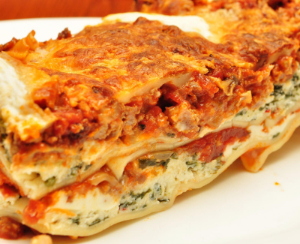
          <li>lasagna</li>
        </ul>
        <figure>
          <img src="https://cdn.freecodecamp.org/curriculum/cat-photo-app/lasagna.jpg" alt="A slice of lasagna on a plate.">
          <figcaption>Cats <em>love</em> lasagna.</figcaption>  
        </figure>
        <h3>Top 3 things cats hate:</h3>
        <ol>
          <li>flea treatment</li>
          <li>thunder</li>
          <li>other cats</li>
        </ol>
        <figure>
          <img src="https://cdn.freecodecamp.org/curriculum/cat-photo-app/cats.jpg" alt="Five cats looking around a field.">
          <figcaption>Cats <strong>hate</strong> other cats.</figcaption>  
        </figure>
      </section>
      <section>
        <h2>Cat Form</h2>
        <form action="https://freecatphotoapp.com/submit-cat-photo">
          <input type="text" name="catphotourl" placeholder="cat photo URL" required>

<!-- User Editable Region -->

          <button>Submit</button>

<!-- User Editable Region -->

        </form>
      </section>
    </main>
  </body>
</html>

```

### Your browser information:

用户代理是： `Mozilla/5.0 (Windows NT 10.0; Win64; x64) AppleWebKit/537.36 (KHTML, like Gecko) Chrome/120.0.0.0 Safari/537.36 Edg/120.0.0.0`

### Challenge Information:

通过创建猫咪相册应用学习 HTML - 第 43 步

> **[freeCodeCamp.org](https://www.freecodecamp.org/chinese/learn/2022/responsive-web-design/learn-html-by-building-a-cat-photo-app/step-43)**
>
> 免费学习编程

---

<div class="post-metadata">

**Author:** ![miya](https://sea3.discourse-cdn.com/freecodecamp/user_avatar/forum.freecodecamp.org/miya/32/417705_2.png) [@miya](https://forum.freecodecamp.org/u/miya)\
**Post date:** [December 28, 2023, 12:58am UTC](https://forum.freecodecamp.org/t/html-43/658816/2 "2023-12-28T00:58:31Z")

</div>

欢迎来到 freeCodeCamp 社区！

在提问之前，你需要按照题目的要求尝试自己写代码，然后其他人才好帮你找出错误：

> [@1335979600](#):
>
> 将值为 `submit` 的 `type` 属性添加到 `button`

---

<div class="post-metadata">

**Author:** ![Wall](https://avatars.discourse-cdn.com/v4/letter/w/7feea3/32.png) [@Wall](https://forum.freecodecamp.org/u/Wall)\
**Post date:** [January 3, 2024, 6:22pm UTC](https://forum.freecodecamp.org/t/html-43/658816/3 "2024-01-03T18:22:22Z")

</div>

> [@1335979600](#):
>
> `Submit`

“button按钮默认的“type”或者说“职能”就是”提交=submit“，因而此处此时应当扩写为`<button>type="submit"</button>`  
将代码的意图表达清楚完整

---

<div class="post-metadata">

**Author:** ![ILM](https://sea3.discourse-cdn.com/freecodecamp/user_avatar/forum.freecodecamp.org/ilm/32/363239_2.png) [@ILM](https://forum.freecodecamp.org/u/ILM)\
**Post date:** [January 7, 2025, 11:38am UTC](https://forum.freecodecamp.org/t/html-43/658816/4 "2025-01-07T11:38:23Z")

</div>

Closed on January 7, 2025, 11:38am UTC