Here is my pen: https://codepen.io/Mike-was-here123/pen/MLLprL?editors=1010
It is supposed to calculate every possible combination of a string you put in and output it for you. Currently, none of the fields are set up and a default “1234” string is being used with 4 characters per combination and no repeats.
When you load up the page the user should see this:

After hitting the calculate button their should a new section for the process:

However, that is not what is happening. Instead, when the user hits calculate this happens:

My issue is, how do i fix this? Here is how it works to help figure it out.
On CSS line 105 I hide 2 divs that make up the process. This is why when you first load up the page it is hidden. Here you have the HTML code and the appropriate CSS code that hides it:

When the user hits the calculate button, it runs the JS starting on line 82. On line 85 i load the .inputCheckDiv by changing the CSS code to visible so i can display a error code if the user’s inputs are impossible for the program to run. Then, the program will return and not continue to load more HTML.
The set parameters i am currently doing for testing will not provide a error code, and will load the div with “Input Test Passed” as seen on line 94.

If the Input passes, I then load .passedDiv on line 95. This container encompasses the rest of the HTML for the process section. On lines 96 - 108 you will see how i go in and edit the HTML content of each of the white boxes using functions i made on line 80 and below. Then on lines 109 - 112 I reset variables.
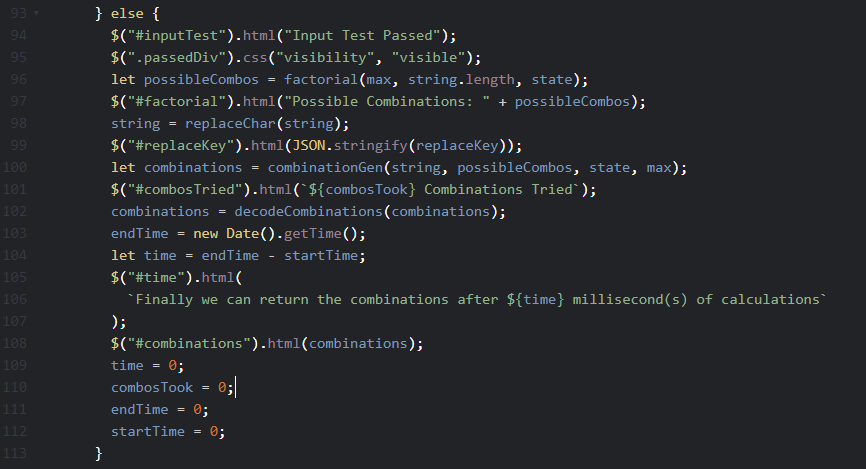
Basically, lines 85 - 95 are the only lines of code causing this issue.
Sorry if i wrote too much, but i am wondering why the HTML comes up messed up? The container div that surrounds the entire thing is .main on CSS line 5. The height does not adjust, and the process section will get squeezed on top of each other.
