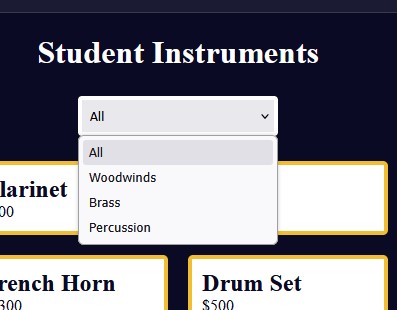
Tell us what’s happening:
The instruction of Step 7 seems ambiguous.
It says
Now, declare two variables selectContainer and productsContainer and assign them your HTML dropdown and the element with the class products-container, respectively.
It does not include the class select-container when the expected answer is code like this
const selectContainer = document.querySelector(".select-container");
.
Your code so far
<!-- file: index.html -->
<!DOCTYPE html>
<html lang="en">
  <head>
    <meta charset="UTF-8" />
    <meta name="viewport" content="width=device-width, initial-scale=1.0" />
    <title>Music Instruments product page</title>
    <link rel="stylesheet" href="./styles.css" />
  </head>
  <body>
    <h1>Student Instruments</h1>

    <main>
      <select class="select-container">
        <option id="all" value="all">All</option>
        <option id="woodwinds" value="woodwinds">Woodwinds</option>
        <option id="brass" value="brass">Brass</option>
        <option id="percussion" value="percussion">Percussion</option>
      </select>

      <div class="products-container">
        <div class="card">
          <h2>Flute</h2>
          <p>$500</p>
        </div>
        <div class="card">
          <h2>Clarinet</h2>
          <p>$200</p>
        </div>
        <div class="card">
          <h2>Oboe</h2>
          <p>$4000</p>
        </div>

        <div class="card">
          <h2>Trumpet</h2>
          <p>$200</p>
        </div>
        <div class="card">
          <h2>Trombone</h2>
          <p>$300</p>
        </div>
        <div class="card">
          <h2>French Horn</h2>
          <p>$4300</p>
        </div>

        <div class="card">
          <h2>Drum Set</h2>
          <p>$500</p>
        </div>
        <div class="card">
          <h2>Xylophone</h2>
          <p>$3000</p>
        </div>
        <div class="card">
          <h2>Cymbals</h2>
          <p>$200</p>
        </div>
        <div class="card">
          <h2>Marimba</h2>
          <p>$3000</p>
        </div>
      </div>
    </main>
    <script src="./script.js"></script>
  </body>
</html>
/* file: styles.css */
*,
*::before,
*::after {
  margin: 0;
  padding: 0;
  box-sizing: border-box;
}

:root {
  --dark-grey: #0a0a23;
  --white: #ffffff;
  --yellow: #f1be32;
}

body {
  background-color: var(--dark-grey);
  color: var(--white);
}

h1 {
  text-align: center;
  margin-top: 20px;
}

.select-container {
  display: block;
  margin: 25px auto;
  padding: 8px;
  border: 4px solid var(--white);
  border-radius: 4px;
  width: 200px;
}

.products-container {
  display: flex;
  flex-direction: column;
  flex-wrap: wrap;
  align-items: center;
  justify-content: center;
  gap: 20px;
}

@media (min-width: 760px) {
  .products-container {
    flex-direction: row;
  }
}

.card {
  background-color: var(--white);
  color: var(--dark-grey);
  border: 4px solid var(--yellow);
  border-radius: 5px;
  padding: 10px;
  width: 200px;
}
/* file: script.js */
const instrumentsArr = [
  { category: "woodwinds", instrument: "Flute", price: 500 },
  { category: "woodwinds", instrument: "Clarinet", price: 200 },
  { category: "woodwinds", instrument: "Oboe", price: 4000 },
  { category: "brass", instrument: "Trumpet", price: 200 },
  { category: "brass", instrument: "Trombone", price: 300 },
  { category: "brass", instrument: "French Horn", price: 4300 },
  { category: "percussion", instrument: "Drum Set", price: 500 },
  { category: "percussion", instrument: "Xylophone", price: 3000 },
  { category: "percussion", instrument: "Cymbals", price: 200 },
  { category: "percussion", instrument: "Marimba", price: 3000 }
]

// User Editable Region

Now, declare two variables selectContainer and productsContainer and assign them your HTML dropdown and the element with the class products-container, respectively.

const selectContainer =
const productsContainer = document.querySelector(".products-container");
// User Editable Region
Your browser information:
User Agent is: Mozilla/5.0 (Windows NT 10.0; Win64; x64; rv:142.0) Gecko/20100101 Firefox/142.0
Challenge Information:
Build a Music Instrument Filter - Step 7
https://www.freecodecamp.org/learn/full-stack-developer/workshop-music-instrument-filter/step-7