Tell us what’s happening:
My code is doing everything what is mentioned but last two tests are failing. Please help me to identify the problem.
Your code so far
<!-- file: index.html -->
<!DOCTYPE html>
<html lang="en">

<head>
    <meta charset="utf-8">
    <meta name="viewport" content="width=device-width, initial-scale=1.0">
    <title>Real Time Counter</title>
</head>

<body>
    <textarea id="text-input"></textarea>
    <p id="char-count">Character Count: 0/50</p>
<script src="script.js"></script>
</body>
</html>
/* file: script.js */
const inputArea = document.querySelector("#text-input");
const outputText = document.querySelector("#char-count");

function getInputLengthValue() {
let inputValue = inputArea.value.split("");
let inputLength = inputValue.length;

if(inputLength < 50) {
return outputText.textContent = `Character Count: ${inputLength}/50`;
}
else if(inputLength >= 50) {
  inputArea.style.color = "red";
  inputArea.disabled = true;
  return outputText.textContent = `Character Count: ${inputLength}/50`;
}
};

inputArea.addEventListener("input", getInputLengthValue);
/* file: styles.css */
Your browser information:
User Agent is: Mozilla/5.0 (Windows NT 10.0; Win64; x64) AppleWebKit/537.36 (KHTML, like Gecko) Chrome/133.0.0.0 Safari/537.36
Challenge Information:
Build a Real Time Counter - Build a Real Time Counter
https://www.freecodecamp.org/learn/full-stack-developer/lab-real-time-counter/build-a-real-time-counter
For the last test try this
https://forum.freecodecamp.org/t/build-a-real-time-counter-cant-pass-the-last-test/731541
Note this as well:
When I saw test 5 ( 5. When the character count is 50 , the text should be displayed in red) I thought entered text should be red. I fixed it. 
Yes, I also felt that need later. I used maxlength property in html. But still test doesn’t passes
My updated code-
const inputArea = document.querySelector("#text-input");
const outputText = document.querySelector("#char-count");

function getInputLengthValue() {
let inputValue = inputArea.value.split("");
let inputLength = inputValue.length;

if(inputLength < 50) {
  outputText.style.color = "black";
  return outputText.textContent = `Character Count: ${inputLength}/50`;
}
else if(inputLength >= 50) {
  outputText.style.color = "red";
  return outputText.textContent = `Character Count: ${inputLength}/50`;
}
};

inputArea.addEventListener("input", getInputLengthValue);
html code i changed-
<textarea id="text-input" maxlength="50"></textarea>
added maxlength property.
In JS code , once character count reached 50, that text remained red, so I added a line to change color back to black.
It is happening in my code, I can delete back if I type 50 characters
I think what they are saying is:
What happens if somehow 55 characters are entered? Your CODE needs to remove the extra characters, not the user?
But in test 6 it says-
I need to block the inputarea if character = 50.
I will write it exactly below-
- If character count is greater than or equal to
50 , the user shouldn’t be able to enter more characters.
That’s a good point. The instructions don’t seem very clear on this point. Seems like a secret requirement.
send your inputLength variable to the console and check exactly what’s being tested.
else if(inputLength >= 50) {
  console.log(inputLength)
  outputText.style.color = "red";
It prints a no., similar to what gets printed in the character count text
What numbers does it print?
the no. of characters I type in the textarea
Please show me the numbers that it prints. What numbers specifically. When you run the tests.
ILM
17
you can post a screenshot here
breaking a discussion in multiple places is not useful and confusing
okay, I didn’t knew that. Sorry
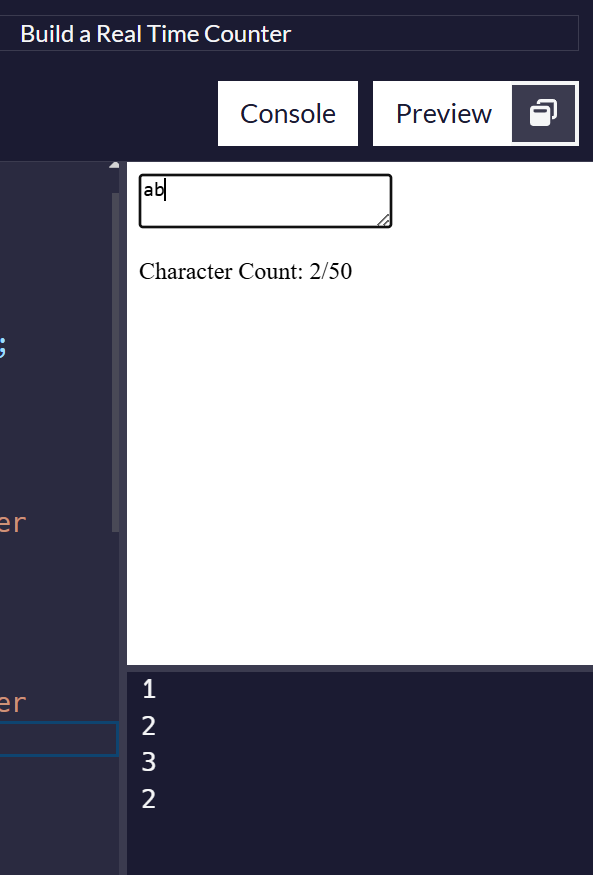
when I type abc then delete c, this is the result I got in console.
Also see 2nd photograph, color changes and I can still delete but can’t type more.
Also see 3rd image, when I deleet 1 character.
And when you click “Run the Tests” ?