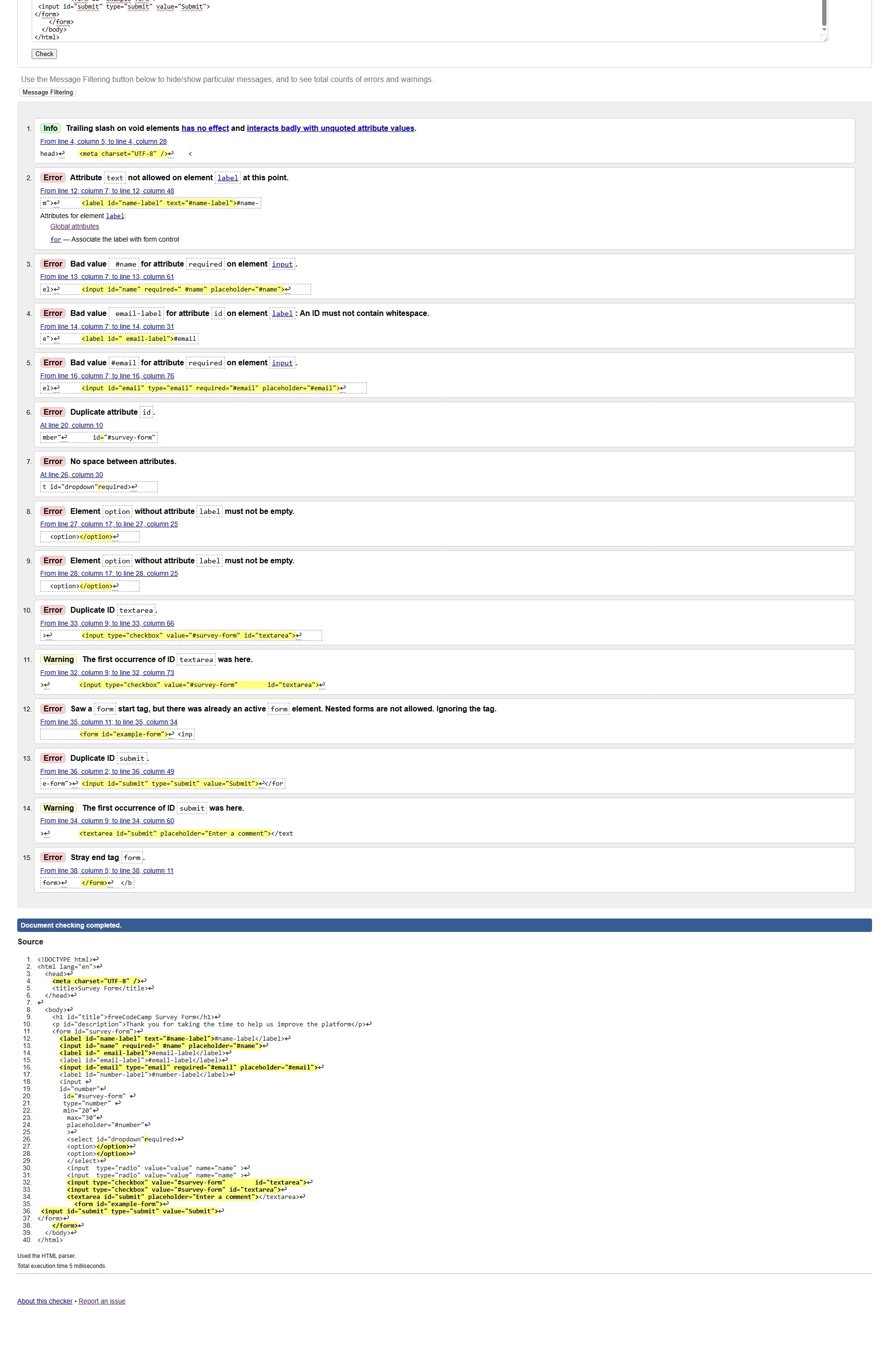
hello i hope you are fine, i have problem with my code i need help for it .Thank you
<!DOCTYPE html>
<html lang="en">
  <head>
    <meta charset="UTF-8" />
    <title>Survey Form</title>
  </head>

  <body>
    <h1 id="title">freeCodeCamp Survey Form</h1>
    <p id="description">Thank you for taking the time to help us improve the platform</p>
    <form id="survey-form">
      <label id="name-label" text="#name-label">#name-label</label>
      <input id="name" required=" #name" placeholder="#name">
      <label id=" email-label">#email-label</label>
      <label id="email-label">#email-label</label>
      <input id="email" type="email" required="#email" placeholder="#email">
      <label id="number-label">#number-label</label>
      <input
      id="number"
       id="#survey-form"
       type="number"
       min="20"
        max="30"
        placeholder="#number"
        >
        <select id="dropdown"required>
        <option></option>
        <option></option>
        </select>
        <input  type="radio" value="value" name="name" >
        <input  type="radio" value="value" name="name" >
        <input type="checkbox" value="#survey-form"        id="textarea">
        <input type="checkbox" value="#survey-form" id="textarea">
        <textarea id="submit">

          </textarea>
          <button id="" submit="">
    </form>
  </body>
</html>
User Agent is: Mozilla/5.0 (Windows NT 10.0; Win64; x64) AppleWebKit/537.36 (KHTML, like Gecko) Chrome/142.0.0.0 Safari/537.36 Edg/142.0.0.0
Build a Survey Form - Build a Survey Form
dhess
November 23, 2025, 4:06pm
3
Can you talk about what it is you don’t understand?
Teller
November 23, 2025, 4:49pm
4
Hi @willyowona35
Check how you used the id attribute in other parts of your code.
Happy coding
dhess
November 23, 2025, 5:04pm
5
Your code has other errors, so I suggest running it through this HTML validator:
Just copy/paste your code in and check it. Then fix/check until the validator says it’s okay. If you scroll to the bottom, you’ll see all the lines it doesn’t like highlighted.
Hope that helps.
do you still have a problem
i don’t know how to solve it and the web page of my code is not the same with the exemple project
dhess
November 24, 2025, 3:06pm
8
Did you use the HTML validator? If so, please share your updated code. Your web page doesn’t need to look exactly like the example, but you do need to do what is asked in the user stories. Do have specific questions about your code?
yes the step, 42 and 43 i don’t get answer about it
ILM
November 24, 2025, 3:59pm
11
please work on fixing those errors
on the code just two steps to resolve the code and finish the task so i am confuse
ILM
November 24, 2025, 4:02pm
13
the syntax errors are making the tests not pass, fix the syntax errors that the validator is showing
dhess
November 24, 2025, 4:07pm
14
I assume you mean Tests #42 and #43 , right?
willyowona35:
<button id="" submit="">
Your id attribute has no value and you have no type attribute. The button element does not take a submit attribute.
You have many more errors than the tests are pointing to right now. You need to go through the validator errors and fix them one by one. After you fix one, check your code again to make sure it’s been corrected.
please i need help for this i have restarted the code ,so i don’t see how to do it
<!DOCTYPE html>
<html lang="en">
  <head>
    <meta charset="UTF-8" />
    <title>Survey Form</title>
  </head>
  <h1 id="title">freeCodeCamp Survey Form</h1>
  <p id="description">Thank you for taking the time to help us improve the platform</p>
  <form id="survey-form">
    <label id="name-label" for="Name">Name</label>
    <input id="name" type="text" placeholder="Enter your name" required ><br>
    <label id="email-label"for="email">Email</label>
    <input id="email" type="email" placeholder="Enter your Email" required> <br>
    <label  id="Age">Age(optional)</label>
    <input type="number" id="number" text="Age" placeholder="Age" required min="10" max="10"><br>
    <p>Which option best describes your current role?</p>

    <select name ="dropdown" id="dropdown">
      <option value="student">student</option>
      <option value="Full time job">Full time job</option>
      <option value="Full time learnear">Full time learnear</option>
      <option value="prefer not to say">prefer not to say</option>
      <option select value="select current role">select current role</option>
      <option value="others">others</option>
    </select>
    <p>Would you recommend freeCodeCamp to a friend?</p>
     <input id="Definitely-option" type="radio" name="Definitely-option"/>
          <label for="Definitely-option">Definitely</label>
          <input id="May-bay-option" type="radio" name="May-bay-option"/>
          <label for="May-be-option">Maybe</label>
          <input id="Not sure" type="radio"name="Not sure">
          <label for="Not sure">Not sure</label>
          <p>What is your favorite feature of freeCodeCamp?</p>
      <select name="feature" id="feature">
         <option select value="select an option">select an option</option>
        <option value="challenges">challenges</option>
        <option value="projects">projects</option>
        <option value="community">community</option>
        <option value="open source">open source</option>

      </select>
      <p>What would you like to see improved? (Check all that apply)</p>
      <input type="checkbox" id="Front-end Projects" name="Front-end Projects" value="Front-end Projects">
      <label for="Front-end Projects">Front-end Projects</label>
      <input type="checkbox" id="Back-end Projects" name="Back-end Projects" value="Back-end Projects">
      <label for="Back-end Projects">Back-end Projects</label>
   <input type="checkbox" id="Data Visualization" name="Data Visualization" value="Data Visualization">
   <label for="Data Visualization">Data Visualization</label>
   <input type="checkbox" id="Challenges" name="Challenges" value="Challenges">
   <label for="Challenges">Challenges </label>
<input type="checkbox" id="Open Source Community" name="Open Source Community" value="Open Source Community">
   <label for="Open Source Community">Open Source Community</label>
    <input type="checkbox" id="Gitter help rooms" name="Gitter help rooms" value="Gitter help rooms">
   <label for="Gitter help rooms">Gitter help rooms</label>
<input type="checkbox" id="Videos" name="Videos" value="Videos">
   <label for="Videos">Videos</label>
<input type="checkbox" id="City Meetups" name="City Meetups" value="City Meetups">
   <label for="City Meetups">City Meetups</label>
   <input type="checkbox" id="Wiki" name="Wiki" value="Wiki">
   <label for="Wiki">Wiki</label>
  <input type="checkbox" id="Forum" name="Forum" value="Forum">
   <label for="Forum">Forum</label>
     <input type="checkbox" id="Additional Courses" name="Additional Courses" value="Additional Courses">
   <label for="Additional Courses">Additional Courses</label>
   <p>Any comments or suggestions?</p>
   <textarea cols="20" rows="2" name="comments" id="comments" placeholder="Enter your comment here..."></textarea> <br>
   <button id= "submit" type="submit">submit</button>


  <body></body>
</html>
User Agent is: Mozilla/5.0 (Windows NT 10.0; Win64; x64) AppleWebKit/537.36 (KHTML, like Gecko) Chrome/142.0.0.0 Safari/537.36 Edg/142.0.0.0
Build a Survey Form - Build a Survey Form
Hi, somewhere in your code, you need to have a label element with the mentioned ID, cause it’s missing.
dhess
November 25, 2025, 5:15pm
17
Your code is still showing many errors in the HTML validator. Most of them have the same message: An ID must not contain whitespace.
Pay attention to the test feedback. For example, Test #21 says, “You should have a label element with an id of number-label.” What line of code satisfies that test?