AL-Salam Alikoum  (Hello)!
have a small problem, hope I get solved here, and Thanks
I’m learning Front.End at UDACITY using (JS), at Web API Lessons I got a small problem which is I can’t pair the server.js with app.js
Files Dir: ↓↓↓
C:\Users\x13th\Desktop\FWD\Java Script\Web API & Asynchronous Applications\re\D.L.Server
L3Server.js File ↓↓↓
/* Express */
//config express to run server and rooutes
const express = require("express");
//start up an instance of app
const app = express();

/* Dependencies */
const bodyParser = require('body-parser');
/* MiddleWare */
//config express to use body-parser as middleware
app.use(bodyParser.urlencoded({ extended: false }));
app.use(bodyParser.json());

/* config cors to connect it with app*/
//cors for cross origin allowance
const cors = require('cors');
app.use(cors());

/* Initialize the mail project folder */
app.use(express.static("/D.L.Server"));

/* Server Configration */
//set up port
const port = 8080;
//Spin up the server
server = app.listen(port, () => {console.log("Server Running"); console.log(`Running of Localhost: ${port}`);});

/*
//Creat Empty JS Object to act as endpoint for all routes
allData = {}

//Respond with (Sending Response!) When a Get request is made to the homepage
app.get("/", (req, res) => {res.send("Sending Response!");});
app.get ("/all", (req,res) => {res.send(allData);console.log(allData);});

//POST method route
app.post("/", (req, res) => {res.send("POST Received");});
*/

app.get("/add", (req ,res) => {res.send(req.body);});

app.get("/", (req, res) => {res.send("Sending Response!");});
//app.get("/add", (req, res) => {res.send("Sending Res");});

//Create an Array to hold data
let data = []
/*Create post with url path
with function to add the data received from request body(req.body)*/
app.post("/add", (req, res) => {console.log(req.body); data.push(req.body);console.log(data)});

app.post('/add', function (request, response) {
    let data = request.body;
    console.log(data);
});
L3app.js File ↓↓↓
const postData = async ( url = '', data = {})=>{
    console.log(data);
      const response = await fetch(url, {
      method: 'POST',
      credentials: 'same-origin',
      headers: {
          'Content-Type': 'application/json',
      },
     // Body data type must match "Content-Type" header
      body: JSON.stringify(data),
    });

      try {
        const newData = await response.json();
        console.log(newData);
        return newData;
      }catch(error) {
      console.log("error", error);
      }
  }

postData('/', {movie:" the-matrix", score: 5})
postData('/add', {answer:42})
index.html File ↓↓↓
<!DOCTYPE html>
<html>
<head>
<meta charset="UTF-8">
<title>Title</title>
</head>
 <body>
<div id = "app">
test

  </div>
<script src="L3app.js" type="text/javascript"></script>


</body>
and the last File is package.json >> i get it from command ($ npm init)
so my problem is when I put this code at app.js
postData('/addMovie', {movie:' the-matrix', score:5})
and when I run the server must get results like this in the browser console and in terminal
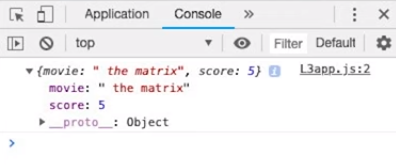
but that’s never happened, and I didn’t know why!
 and Thanks
