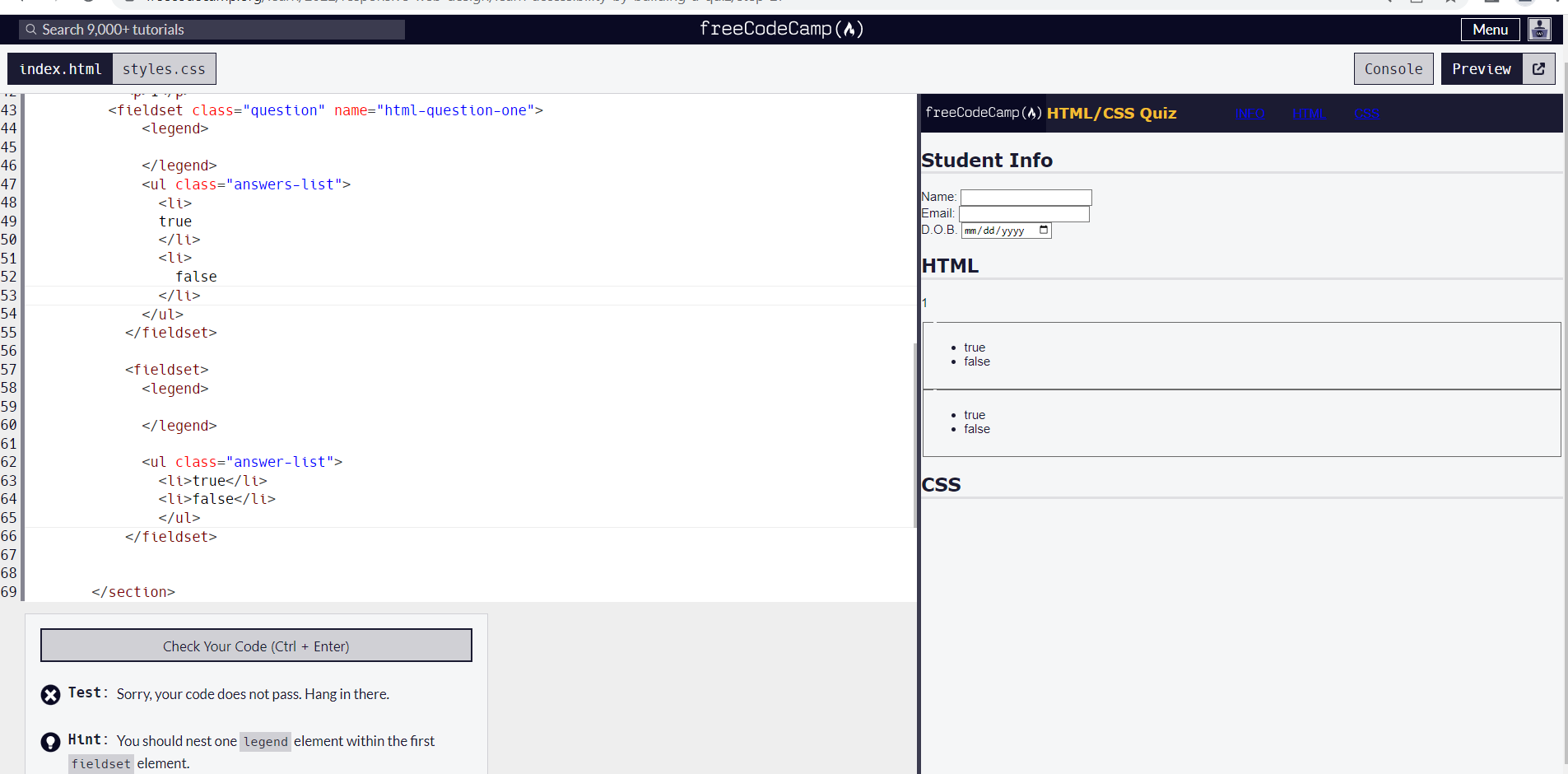
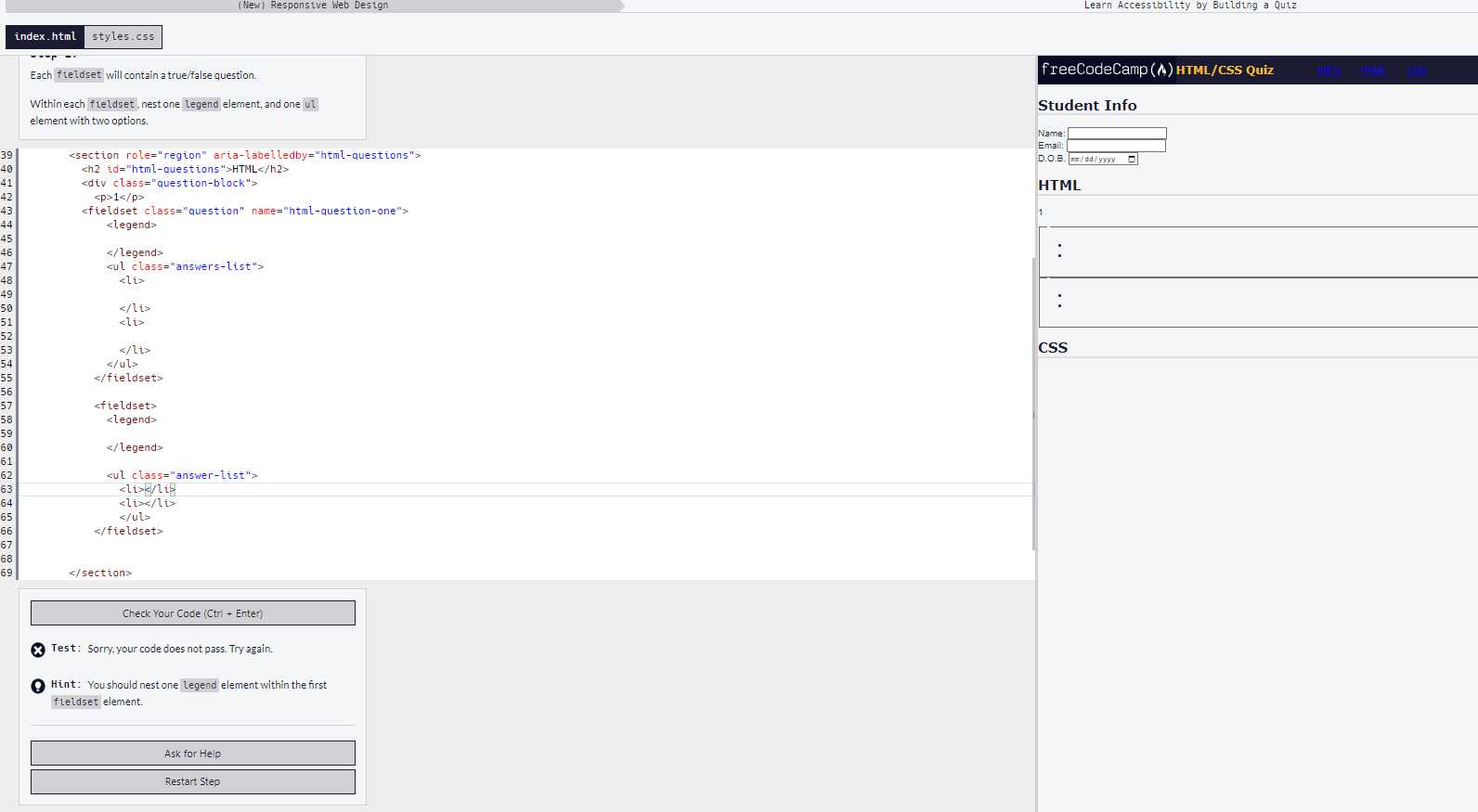
Tell us what’s happening:
Your code so far
<!-- file: index.html -->
<!DOCTYPE html>
<html lang="en">
  <head>
    <meta charset="UTF-8" />
    <meta name="viewport" content="width=device-width, initial-scale=1.0" />
    <meta name="description" content="freeCodeCamp Accessibility Quiz practice project" />
    <title>Accessibility Quiz</title>
    <link rel="stylesheet" href="styles.css" />
  </head>
  <body>
    <header>
      <img id="logo" src="https://cdn.freecodecamp.org/platform/universal/fcc_primary.svg">
      <h1>HTML/CSS Quiz</h1>
      <nav>
        <ul>
          <li><a href="#student-info">INFO</a></li>
          <li><a href="#html-questions">HTML</a></li>
          <li><a href="#css-questions">CSS</a></li>
        </ul>
      </nav>
    </header>
    <main>
      <form method="post" action="https://freecodecamp.org/practice-project/accessibility-quiz">
        <section role="region" aria-labelledby="student-info">
          <h2 id="student-info">Student Info</h2>
          <div class="info">
            <label for="student-name">Name:</label>
            <input type="text" name="student-name" id="student-name" />
          </div>
          <div class="info">
            <label for="student-email">Email:</label>
            <input type="email" name="student-email" id="student-email" />
          </div>
          <div class="info">
            <label for="birth-date">D.O.B.<span class="sr-only">(Date of Birth)</span></label>
            <input type="date" name="birth-date" id="birth-date" />
          </div>
        </section>
        <section role="region" aria-labelledby="html-questions">
          <h2 id="html-questions">HTML</h2>
          <div class="question-block">
            <p>1</p>
          <fieldset class="question" name="html-question-one">
              <legend>
                The legend element represents a caption for the content of its
                parent fieldset element
              </legend>
              <ul class="answers-list">
                <li>
                true
                </li>
                <li>
                  false
                </li>
              </ul>
            </fieldset>

            <fieldset>
              <legend>
                The legend element represents a caption for the content of its
                parent fieldset element
              </legend>

              <ul class="answer-list">
                <li>true</li>
                <li>false</li>
                </ul>
            </fieldset>
          </div>
          </div>
        </section>
        <section role="region" aria-labelledby="css-questions">
          <h2 id="css-questions">CSS</h2>
        </section>
      </form>
    </main>
  </body>
</html>
/* file: styles.css */
body {
  background: #f5f6f7;
  color: #1b1b32;
  font-family: Helvetica;
  margin: 0;
}

header {
  width: 100%;
  height: 50px;
  background-color: #1b1b32;
  display: flex;
}

#logo {
  width: max(100px, 18vw);
  background-color: #0a0a23;
  aspect-ratio: 35 / 4;
  padding: 0.4rem;
}

h1 {
  color: #f1be32;
  font-size: min(5vw, 1.2em);
}

nav {
  width: 50%;
  max-width: 300px;
  height: 50px;
}

nav > ul {
  display: flex;
  justify-content: space-evenly;
}

h1,
h2 {
  font-family: Verdana, Tahoma;
}

h2 {
  border-bottom: 4px solid #dfdfe2;
}

.sr-only {
  position: absolute;
  width: 1px;
  height: 1px;
  padding: 0;
  margin: -1px;
  overflow: hidden;
  clip: rect(0, 0, 0, 0);
  white-space: nowrap;
  border: 0;
}
Your browser information:
User Agent is: Mozilla/5.0 (Windows NT 10.0; Win64; x64) AppleWebKit/537.36 (KHTML, like Gecko) Chrome/106.0.0.0 Safari/537.36
Challenge: Learn Accessibility by Building a Quiz - Step 27
Link to the challenge:
Why my code is not passed . i am exactly add one legend in first fieldset.
hbar1st
October 21, 2022, 10:44am
2
Remove the text you added in the legend as it was not requested (for both of them)
After the last closing ‘fieldset’ tag you don’t need two closing ‘div’ tags.
After removing text. Code is not passed.
hbar1st
October 21, 2022, 10:57am
5
Remove the true and false text as well .
hbar1st
October 21, 2022, 11:01am
7
Please post the actual code so we can test it.
hbar1st
October 21, 2022, 11:23am
10
Please post your code in a code block here. I cannot see it otherwise.
```
<!DOCTYPE html>
<html lang="en">
  <head>
    <meta charset="UTF-8" />
    <meta name="viewport" content="width=device-width, initial-scale=1.0" />
    <meta name="description" content="freeCodeCamp Accessibility Quiz practice project" />
    <title>Accessibility Quiz</title>
    <link rel="stylesheet" href="styles.css" />
  </head>
  <body>
    <header>
      <img id="logo" src="https://cdn.freecodecamp.org/platform/universal/fcc_primary.svg">
      <h1>HTML/CSS Quiz</h1>
      <nav>
        <ul>
          <li><a href="#student-info">INFO</a></li>
          <li><a href="#html-questions">HTML</a></li>
          <li><a href="#css-questions">CSS</a></li>
        </ul>
      </nav>
    </header>
    <main>
      <form method="post" action="https://freecodecamp.org/practice-project/accessibility-quiz">
        <section role="region" aria-labelledby="student-info">
          <h2 id="student-info">Student Info</h2>
          <div class="info">
            <label for="student-name">Name:</label>
            <input type="text" name="student-name" id="student-name" />
          </div>
          <div class="info">
            <label for="student-email">Email:</label>
            <input type="email" name="student-email" id="student-email" />
          </div>
          <div class="info">
            <label for="birth-date">D.O.B.<span class="sr-only">(Date of Birth)</span></label>
            <input type="date" name="birth-date" id="birth-date" />
          </div>
        </section>

<section role="region" aria-labelledby="html-questions">
          <h2 id="html-questions">HTML</h2>
          <div class="question-block">
            <p>1</p>
          <fieldset class="question" name="html-question-one">
              <legend>

              </legend>
              <ul class="answers-list">
                <li>

                </li>
                <li>

                </li>
              </ul>
            </fieldset>

            <fieldset>
              <legend>

              </legend>

              <ul class="answer-list">
                <li></li>
                <li></li>
                </ul>
            </fieldset>


        </section>
        <section role="region" aria-labelledby="css-questions">
          <h2 id="css-questions">CSS</h2>
        </section>
      </form>
    </main>
  </body>
</html>
hbar1st
October 21, 2022, 11:26am
12
Shabana_Asif:
<ul class="answer-list">
Remove the classes from the new elements.
after removing it can processed
<!DOCTYPE html>
<html lang="en">
  <head>
    <meta charset="UTF-8" />
    <meta name="viewport" content="width=device-width, initial-scale=1.0" />
    <meta name="description" content="freeCodeCamp Accessibility Quiz practice project" />
    <title>Accessibility Quiz</title>
    <link rel="stylesheet" href="styles.css" />
  </head>
  <body>
    <header>
      <img id="logo" src="https://cdn.freecodecamp.org/platform/universal/fcc_primary.svg">
      <h1>HTML/CSS Quiz</h1>
      <nav>
        <ul>
          <li><a href="#student-info">INFO</a></li>
          <li><a href="#html-questions">HTML</a></li>
          <li><a href="#css-questions">CSS</a></li>
        </ul>
      </nav>
    </header>
    <main>
      <form method="post" action="https://freecodecamp.org/practice-project/accessibility-quiz">
        <section role="region" aria-labelledby="student-info">
          <h2 id="student-info">Student Info</h2>
          <div class="info">
            <label for="student-name">Name:</label>
            <input type="text" name="student-name" id="student-name" />
          </div>
          <div class="info">
            <label for="student-email">Email:</label>
            <input type="email" name="student-email" id="student-email" />
          </div>
          <div class="info">
            <label for="birth-date">D.O.B.<span class="sr-only">(Date of Birth)</span></label>
            <input type="date" name="birth-date" id="birth-date" />
          </div>
        </section>
        <section role="region" aria-labelledby="html-questions">
          <h2 id="html-questions">HTML</h2>
          <div class="question-block">
            <p>1</p>
          <fieldset class="question" name="html-question-one">
              <legend>

              </legend>
              <ul>
                <li>
                </li>
                <li>
                </li>
              </ul>
            </fieldset>

            <fieldset>
              <legend>
              </legend>
              <ul>
                <li></li>
                <li></li>
                </ul>
            </fieldset>

        </section>
        <section role="region" aria-labelledby="css-questions">
          <h2 id="css-questions">CSS</h2>
        </section>
      </form>
    </main>
  </body>
</html>
Where is the closing tag for the
After adding closing tag it is not processed.
<!DOCTYPE html>
<html lang="en">
  <head>
    <meta charset="UTF-8" />
    <meta name="viewport" content="width=device-width, initial-scale=1.0" />
    <meta name="description" content="freeCodeCamp Accessibility Quiz practice project" />
    <title>Accessibility Quiz</title>
    <link rel="stylesheet" href="styles.css" />
  </head>
  <body>
    <header>
      <img id="logo" src="https://cdn.freecodecamp.org/platform/universal/fcc_primary.svg">
      <h1>HTML/CSS Quiz</h1>
      <nav>
        <ul>
          <li><a href="#student-info">INFO</a></li>
          <li><a href="#html-questions">HTML</a></li>
          <li><a href="#css-questions">CSS</a></li>
        </ul>
      </nav>
    </header>
    <main>
      <form method="post" action="https://freecodecamp.org/practice-project/accessibility-quiz">
        <section role="region" aria-labelledby="student-info">
          <h2 id="student-info">Student Info</h2>
          <div class="info">
            <label for="student-name">Name:</label>
            <input type="text" name="student-name" id="student-name" />
          </div>
          <div class="info">
            <label for="student-email">Email:</label>
            <input type="email" name="student-email" id="student-email" />
          </div>
          <div class="info">
            <label for="birth-date">D.O.B.<span class="sr-only">(Date of Birth)</span></label>
            <input type="date" name="birth-date" id="birth-date" />
          </div>
        </section>
        <section role="region" aria-labelledby="html-questions">
          <h2 id="html-questions">HTML</h2>
          <div class="question-block">
            <p>1</p>
          <fieldset class="question" name="html-question-one">
              <legend>

              </legend>
              <ul>
                <li>
                </li>
                <li>
                </li>
              </ul>
            </fieldset>

            <fieldset>
              <legend>
              </legend>
              <ul>
                <li></li>
                <li></li>
                </ul>
            </fieldset>
        </div>

        </section>
        <section role="region" aria-labelledby="css-questions">
          <h2 id="css-questions">CSS</h2>
        </section>
      </form>
    </main>
  </body>
</html>
It has passed on my side. Try to restart step.
I get the same error after restart the step.
hbar1st
October 22, 2022, 8:41am
20
You seem to have deleted some of the required code that was there at the start.
You will be presented with this code block:
        <section role="region" aria-labelledby="html-questions">
          <h2 id="html-questions">HTML</h2>
          <div class="question-block">
            <p>1</p>
            <fieldset class="question"></fieldset>
          </div>
          <div class="question-block">
            <p>2</p>
            <fieldset class="question"></fieldset>
          </div>
        </section>
All the new code should go between the opening and closing tag of the 2 fieldsets.
system
April 22, 2023, 8:41pm
21
This topic was automatically closed 182 days after the last reply. New replies are no longer allowed.