Tell us what’s happening:
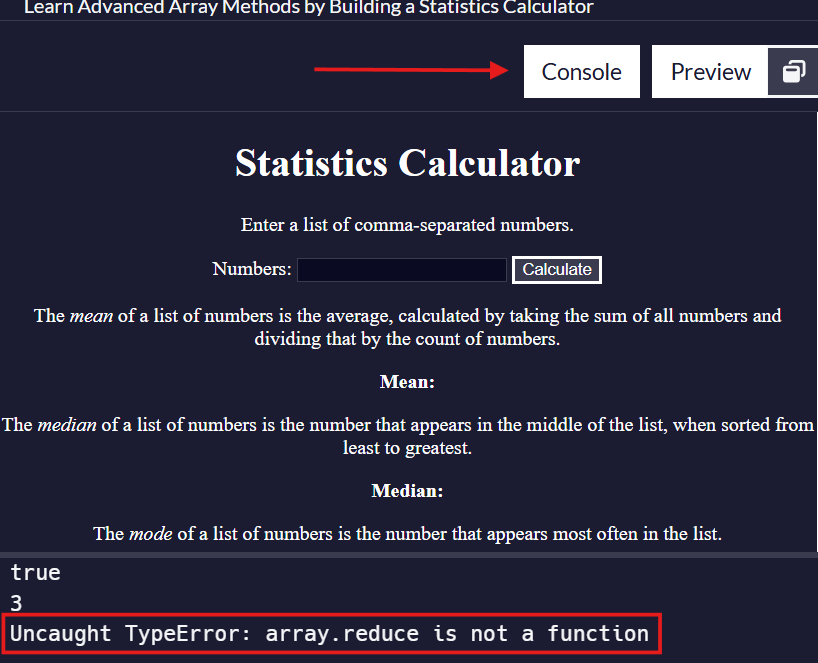
I need of some help not sure where im going wrong it just keeps telling me to have my variable named.
Your code so far
<!-- file: index.html -->
<!DOCTYPE html>
<html lang="en">
  <head>
    <meta charset="utf-8" />
    <meta name="viewport" content="width=device-width, initial-scale=1" />
    <link rel="stylesheet" href="./styles.css" />
    <script src="./script.js"></script>
    <title>Statistics Calculator</title>
  </head>
  <body>
    <h1>Statistics Calculator</h1>
    <p>Enter a list of comma-separated numbers.</p>
    <form onsubmit="calculate(); return false;">
      <label for="numbers">Numbers:</label>
      <input type="text" name="numbers" id="numbers" />
      <button type="submit">Calculate</button>
    </form>
    <div class="results">
      <p>
        The <dfn>mean</dfn> of a list of numbers is the average, calculated by
        taking the sum of all numbers and dividing that by the count of numbers.
      </p>
      <p class="bold">Mean: <span id="mean"></span></p>
      <p>
        The <dfn>median</dfn> of a list of numbers is the number that appears in
        the middle of the list, when sorted from least to greatest.
      </p>
      <p class="bold">Median: <span id="median"></span></p>
      <p>
        The <dfn>mode</dfn> of a list of numbers is the number that appears most
        often in the list.
      </p>
      <p class="bold">Mode: <span id="mode"></span></p>
      <p>
        The <dfn>range</dfn> of a list of numbers is the difference between the
        largest and smallest numbers in the list.
      </p>
      <p class="bold">Range: <span id="range"></span></p>
      <p>
        The <dfn>variance</dfn> of a list of numbers measures how far the values
        are from the mean, on average.
      </p>
      <p class="bold">Variance: <span id="variance"></span></p>
      <p>
        The <dfn>standard deviation</dfn> of a list of numbers is the square
        root of the variance.
      </p>
      <p class="bold">
        Standard Deviation: <span id="standardDeviation"></span>
      </p>
    </div>
  </body>
</html>
/* file: styles.css */
body {
  margin: 0;
  background-color: rgb(27, 27, 50);
  text-align: center;
  color: #fff;
}

button {
  cursor: pointer;
  background-color: rgb(59, 59, 79);
  border: 3px solid white;
  color: white;
}

input {
  background-color: rgb(10, 10, 35);
  color: white;
  border: 1px solid rgb(59, 59, 79);
}

.bold {
  font-weight: bold;
}
/* file: script.js */
const getMean = (array) => array.reduce((acc, el) => acc + el, 0) / array.length;


// User Editable Region

const testArr1 = [1, 2, 3, 4, 5];
const testArr2 = [1, 2, 3, 4, 5, 6];
const isEven = testArr2.length % 2 === 0;
console.log(isEven);
const oddListMedian = testArr1[Math.floor(testArr1.length / 2)];
console.log(oddListMedian);
const evenListMedian = getMean(testArr2.length / 2, testArr2.length / 2 - 1);
console.log(evenListMedian)

// User Editable Region

const getMedian = (array) => {
  const sorted = array.sort((a, b) => a - b);
}

const calculate = () => {
  const value = document.querySelector("#numbers").value;
  const array = value.split(/,\s*/g);
  const numbers = array.map(el => Number(el)).filter(el => !isNaN(el));

  const mean = getMean(numbers);

  document.querySelector("#mean").textContent = mean;
}
Your browser information:
User Agent is: Mozilla/5.0 (Macintosh; Intel Mac OS X 10_15_7) AppleWebKit/605.1.15 (KHTML, like Gecko) Version/18.5 Safari/605.1.15
Challenge Information:
Learn Advanced Array Methods by Building a Statistics Calculator - Step 24
 :
:
