Hello,
I stepped away from freecodecamp to get more JS practice before moving on to the higher level classes.
As part of that, I am doing the “A dynamic shopping list” exercise on the Mozilla Developer page.
I am getting stuck on step # 10. The button I created is inside a function and so I can’t reference it for a new event handler.
Helpful tips would be appreciated!
HTML code:
<!DOCTYPE html>
<html lang="en" dir="ltr">
  <head>
    <meta charset="utf-8">
    <link rel="stylesheet" href="my_shopping_list.css">
    <title>Ye olde shopping list example</title>
  </head>
  <body>

    <h2>This here be me choppin' liss, arrr</h2>

    <input type="text" name="choppee" placeholder="choppee, arr">

    <button id="button" type="submit">Add choppee to list, arr</button>

    <ul>

    </ul>

    <script type="text/javascript" src="my_shopping_list.js">

    </script>
  </body>
</html>
JS code:
// alert('Is this mike on?')
var myList = document.querySelector('ul');
var myInput = document.querySelector('input');
var myButton = document.querySelector('button');

// myButton.onclick = function() {
//      alert("button was clicked");
//    }

myButton.onclick = function() {
     var myListItem = myInput.value;
     console.log(myListItem);
     myInput.value = '';

     var mySecondListItem = document.createElement("li");
     var mySpan = document.createElement("span");
     var mySecondButton = document.createElement("button");
     mySecondButton.innerHTML = "DELETE ME";

     mySecondListItem.appendChild(mySpan);
     mySecondListItem.appendChild(mySecondButton);

     mySpan.textContent = myListItem;

     myList.appendChild(mySecondListItem);
   }

mySecondButton.onclick = function() {
  myList.removeChild(mySecondListItem);
}
It might be better, and simpler to not create a button inside the onClick handler. Instead, create the second button along with your first in the correct location. Then add a class to the second button:
.noDisplay { display: none },
This will hide your element and remove it from the flow. Then in your onClick handler, get that element and remove this class when you want to show it.
So I did that but that only creates ONE “delete” button, no matter how many items I add to the list. What I really need is a “delete” button to be created for each item I add to list.
Right now, when I add a new item to list, it looks like this:
I need it to look like this:
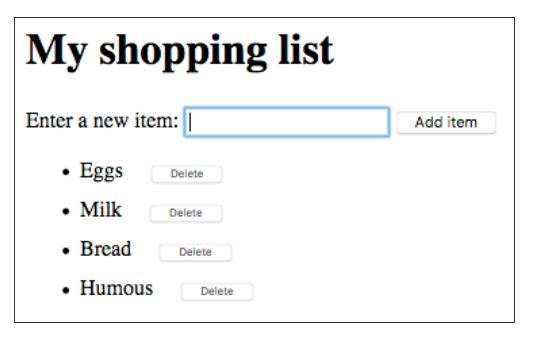
How can I create multiple “DELETE” buttons outside of my “Submit” button function so that I can then reference those “DELETE” buttons outside of the first function?
This is the updated code:
// alert('Is this mike on?')
var myList = document.querySelector('ul');
var myInput = document.querySelector('input');
var myButton = document.querySelector('button');
var mySecondButton = document.createElement("button");
mySecondButton.classList.add("invisible");


// myButton.onclick = function() {
//      alert("button was clicked");
//    }

myButton.onclick = function() {
     var myListItem = myInput.value;
     console.log(myListItem);
     myInput.value = '';

     var mySecondListItem = document.createElement("li");
     var mySpan = document.createElement("span");

     mySecondButton.innerHTML = "DELETE ME";
     mySecondListItem.appendChild(mySpan);
     mySecondListItem.appendChild(mySecondButton);

     mySpan.textContent = myListItem;
     myList.appendChild(mySecondListItem);

     mySecondButton.classList.remove("invisible")
   }

mySecondButton.onclick = function() {
  myList.removeChild(mySecondListItem);
}
I tried inserting the “delete” button inside a function that is called whenever a list item is made. But in order to have the “delete” button to have a seperate variable name, I have to put the function inside a loop. But then how do I get the loop to run once the page has loaded…??
Hi,
In the myButton.click function you are trying to create a unique click handler for each delete button in your shopping list .
You need to attach a generic click handler to every delete button created. The generic handler needs to “know” how to remove its own parent <li> from the DOM.
Good luck
Ok, so if you want a delete button to be next each item, you just reference the new button inside your onClick handler. So you had this right
myButton.onclick = function() {
     var myListItem = myInput.value;
     console.log(myListItem);
     myInput.value = '';

     var mySecondListItem = document.createElement("li");
     var mySpan = document.createElement("span");

     mySecondButton.innerHTML = "DELETE ME";
     mySecondListItem.appendChild(mySpan);
     mySecondListItem.appendChild(mySecondButton);

     mySpan.textContent = myListItem;
     myList.appendChild(mySecondListItem);

     mySecondButton.classList.remove("invisible")

// need to add the click handler here
     mySecondButton.onclick = function() {
       myList.removeChild(mySecondListItem);
       }
   }
Then the first onClick handler will create all those elements every single time as new elements, including a button with it’s own onClick handler.
Thank you to @JM-Mendez and @alhazen1 for your help. This was my final code that worked:
// alert('Is this mike on?')
var myList = document.querySelector('ul');
var myInput = document.querySelector('input');
var myButton = document.querySelector('button');


// myButton.onclick = function() {
//      alert("button was clicked");
//    }

myButton.onclick = function() {
     var myListItem = myInput.value;
     console.log(myListItem);
     myInput.value = '';

     var mySecondListItem = document.createElement("li");
     var mySpan = document.createElement("span");
     var mySecondButton = document.createElement("button");


     mySecondButton.innerHTML = "DELETE ME";
     mySecondListItem.appendChild(mySpan);
     mySecondListItem.appendChild(mySecondButton);

     mySpan.textContent = myListItem;
     myList.appendChild(mySecondListItem);


mySecondButton.onclick = function() {
  myList.removeChild(mySecondListItem);
}
}
