Tell us what’s happening:
My codes cannot pass the last test of creat_spent_chart. I ran it in local and browser and it can print the chart properly. I also checked the browser’s console, but it only showed assertError and no further hint.
Can anyone help me with this problem? Thank you
Your code so far
class Category:

    def __init__(self, categories):
        self.categories = categories
        self.ledger = []

    def __str__(self):
        aster = '*'
        space = ' '
        length = 30
        titleline = aster * int((length - len(self.categories)) / 2) + self.categories + aster * int((length - len(self.categories)) / 2)
        formatted_ledger = titleline

        for item in self.ledger:
            description = item["description"][:23]
            amount = '{:.2f}'.format(item["amount"])[:7]
            formatted_ledger += '\n' + description + space * (length - len(description) - len(amount)) + amount

        balance = self.get_balance()
        formatted_ledger += '\nTotal: ' + str(balance)
        return formatted_ledger

    def deposit(self, amount, description=''):
        self.ledger.append({"amount": amount, "description": description})

    def withdraw(self, amount, description=''):
        checkFund = self.check_funds(amount)
        if checkFund:
            amount_withdraw = 0 - amount
            self.ledger.append({"amount": amount_withdraw, "description": description})
            return True
        else:
            return False

    def get_balance(self):
        balance = 0
        for item in self.ledger:
            balance += item["amount"]
        return balance

    def transfer(self, amount, categories):
        checkFund = self.check_funds(amount)
        if checkFund:
            description1 = f'Transfer to {categories.categories}'
            self.withdraw(amount, description1)
            description2 = f'Transfer from {self.categories}'
            categories.deposit(amount, description2)
            return True
        else:
            return False

    def check_funds(self, amount):
        balance = self.get_balance()
        if amount > balance:
            return False
        else:
            return True

def create_spend_chart(list):
    #chart length
    num = len(list)
    if num > 4:
        return

    #spend count
    spend_list = []
    for category in list:
        spend_count = 0
        for item in category.ledger:
            if item["amount"] < 0:
                spend_count -= item["amount"]
        spend_list.append({'category': category.categories, 'spend_count': spend_count})

    #percentage count
    spend_all = sum(item["spend_count"] for item in spend_list)
    for item in spend_list:
        spend_percent = int(round((item["spend_count"] / spend_all), 1) * 100)
        item["spend_percent"] = spend_percent


    #sort list
    spend_list.sort(key=lambda x: x["spend_percent"], reverse=True)

    #create chart
    titleline = 'Percentage spent by category'
    space = ' '
    o = 'o'
    #blank chart
    chart_list = []
    for i in range(0, 11):
        label = str(100 - i * 10)
        line = space * (3 - len(label)) + label + '|'
        chart_list.append(line)

    #draw percent
    for item in spend_list:
        x = (100 - item["spend_percent"]) / 10
        for i in range(0, 11):
            if x > i :
                chart_list[i] += space * 3
            else:
                chart_list[i] += space + o + space

    #horizontal line
    horizontalline = space * 4 + '-' * (num * 3 + 1)
    chart_list.append(horizontalline)

    #category names
    len0 = len(chart_list)
    max_len = 0
    for item in spend_list:
        if len(item["category"]) > max_len:
            max_len = len(item["category"])
    for i in range(0, max_len):
        names = space * 4
        chart_list.append(names)
    for item in spend_list:
        x =  len(item["category"])
        for i in range(len0, len0 + max_len):
            if x > i - len0:
                chart_list[i] += space + item["category"][i-len0] + space
            else:
                chart_list[i] += space * 3

    chart_string = titleline + '\n' + '\n'.join(chart_list)
    return print(chart_string)


food = Category("Food")
food.deposit(1000, "deposit")
food.withdraw(10.15, "groceries")
food.withdraw(15.89, "restaurant and more food for dessert")
clothing = Category("Clothing")
food.transfer(50, clothing)
print(food)

create_spend_chart([food, clothing])
Your browser information:
User Agent is: Mozilla/5.0 (Windows NT 10.0; Win64; x64) AppleWebKit/537.36 (KHTML, like Gecko) Chrome/124.0.0.0 Safari/537.36
Challenge Information:
Scientific Computing with Python Projects - Budget App
https://www.freecodecamp.org/learn/scientific-computing-with-python/scientific-computing-with-python-projects/budget-app
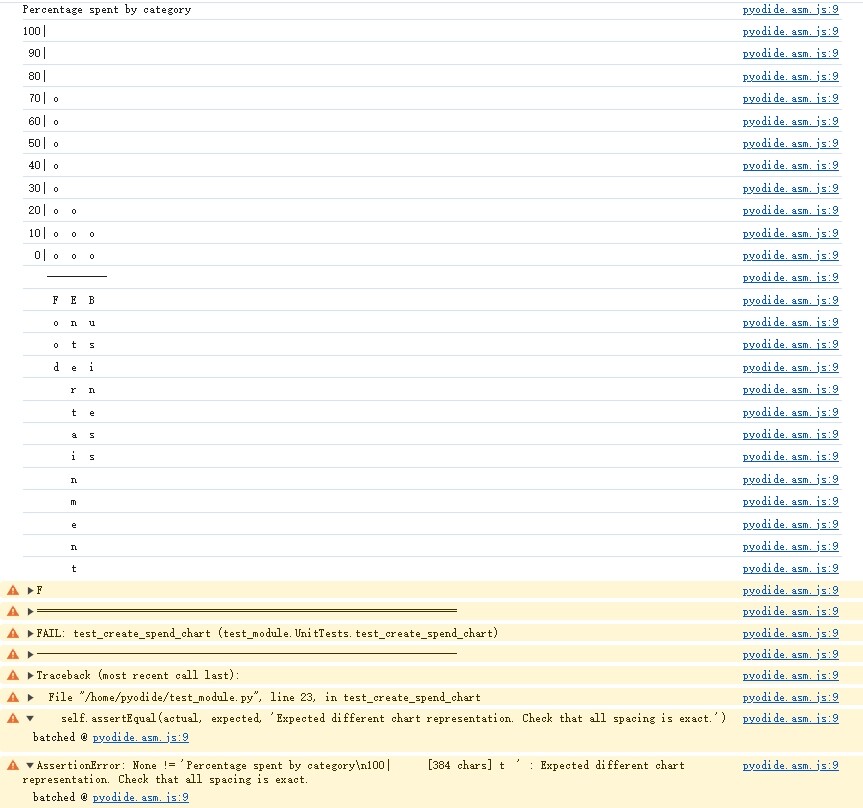

 The example they gave is from large to small. AM I MISUNDERSTAND?
