Hello, I’ve been doing a simple project when suddenly I saw that there is a break in the background gradient so I wonder what might be causing it.Regards
https://codepen.io/VeljkoCukic/pen/KKgaMMW
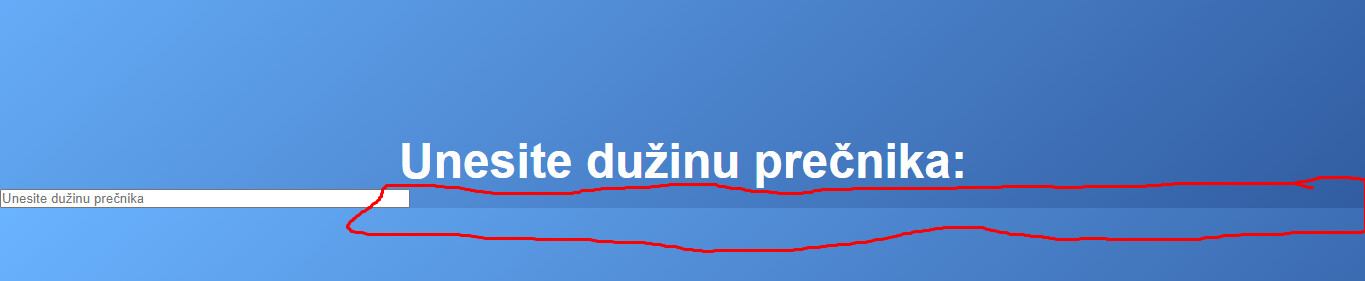
Yeah, I’m not great at CSS, but it doesn’t seem that the body is stretching to fill the screen. It seems to work when I add:
html {
  height: 100%;
}
1 Like
Thanks for Your answer Kevin, that’s also what I thought was the case so I tried adding height:100% at body tag. This is the first time I stumbled across this and I’m still very confused about why it’s happening and what caused it.
Well, again, I’m not CSS expert.
I did read a good book a way back, CSS Mastery. But unfortunately I work mostly in React Native now which doesn’t use true CSS so I’m a bit out of practice. css-tricks.com is also a good resource - I often refer to their section on flex.
A lot of developers struggle with CSS. But that means that if you get good at it, it would put you a step ahead.
I think i finally figured it out.
You have to get rid of
  margin:0;
   padding:0;
This part is making that distortion. Hope I helped
1 Like
}
#centar input{
width:100%;
}
If you changed it to 100% it should work
I didn’t think that was what he was complaining about, the input to filling the full width, as he explicitly set it at 30%. I think he was asking why the gradient didn’t fill the whole page.
2 Likes