Build a book inventory

I am trying to figure out why This is not passing the last part Here is my code.

html{
    background-color: #000;
    color: #fff;
    
}

tr[class="read"]{
    background-image: linear-gradient(to right, #4e54c8, #8f94fb);
}

tr[class="to-read"]{
    background-image: linear-gradient(to right, #ff758c, #ff7eb3);
}

tr[class="in-progress"]{
    background-image: linear-gradient(to right, #00c6ff, #0072ff);
}

span{
    display: inline-block;
}

tr[class="to-read"] span[class="status"]{
    border: 3px solid rgb(214, 234, 69);
    border-radius: 4px;
    background-image: linear-gradient(to right, #c55769, #ff7eb3);
}

tr[class="read"] span[class="status"]{
    border: 3px solid rgb(69, 234, 69);
    border-radius: 4px;
    background-image: linear-gradient(to right, #4e54c8, #8f94fb);
}

tr[class="in-progress"] span[class="status"]{
    border: 3px solid rgb(69, 234, 69);
    border-radius: 4px;
    background-image: linear-gradient(to right, #00c6ff, #0072ff);
}

span[class="status"], span[class^="rate"] {
    height: 20px;
    width: 25px;
    padding: 2px;
}

span[class^="rate"]>span{
    border: 2px solid #fff;
    border-radius: 4px;
    margin: 2px;
    height: 10px;
    width: 10px;
    background-color: #fff;
}

span[class*="one"]span:first-child{
    background-image: linear-gradient(to right, #ff758c, #3cc8e1ff);
}

span[class*="two"]span:nth-child(-n+2) {
    background-image: linear-gradient(to right, #ff758c, #6755a8);
}
span[class*="three"]span {
    background-image: linear-gradient(to right, #ff758c, #186aa1);
}

I have everything else to pass but the last bit. this is the address 46 through 51 are the ones I can’t get to work. They are the last three of the span elements.

this is the html code

<!DOCTYPE html>
<html lang="en">

<head>
  <meta charset="utf-8">
  <title>Book Inventory</title>
  <link rel="stylesheet" href="styles.css">
</head>

<body>
  <h1>Book Inventory</h1>
  <table>

    <thead>

      <tr>

        <th>Title</th>

        <th>Author</th>

        <th>Category</th>

        <th>Status</th>

        <th>Rate</th>

      </tr>

    </thead>

    <tbody id="book-list">

      <!-- Book entries will be dynamically inserted here -->

      <!-- Example book entrie 1 -->

      <tr class="read">

        <td>Taming Demons For Beginners</td>

        <td>Annette Marie</td>

        <td>Fantasy</td>

        <td><span class="status">Read</span></td>

        <td>

          <span class="rate three">

        <span></span>

          <span></span>

          <span></span>

          </span>

        </td>

      </tr>

      <!-- Example book entrie 2 -->

      <tr class="to-read">

        <td>Lonen's War</td>

        <td>Jeffe Kennedy</td>

        <td>Fantasy</td>

        <td><span class="status">To Read</span></td>

        <td>

          <span class="rate two">

        <span></span>

          <span></span>

          <span></span>

          </span>

        </td>

      </tr>

      <!-- Example book entrie 3 -->

      <tr class="in-progress">

        <td>The Invisible Life of Addie LaRue</td>

        <td>V.E. Schwab</td>

        <td>Fantasy</td>

        <td><span class="status">In Progress</span></td>

        <td>

          <span class="rate two">

        <span></span>

          <span></span>

          <span></span>

          </span>

        </td>

      </tr>

      <!-- Example book entrie 4 -->

      <tr class="read">

        <td>The Priory of the Orange Tree</td>

        <td>Samantha Shannon</td>

        <td>Fantasy</td>

        <td><span class="status">Read</span></td>

        <td>

          <span class="rate one">

        <span></span>

          <span></span>

          <span></span>

          </span>

        </td>

      </tr>

      <!-- Example book entrie 5 -->

      <tr class="to-read">

        <td>The House in the Cerulean Sea</td>

        <td>T.J. Klune</td>

        <td>Fantasy</td>

        <td><span class="status">To Read</span></td>

        <td>

          <span class="rate three">

        <span></span>

          <span></span>

          <span></span>

          </span>

        </td>

      </tr>

    </tbody>
  </table>

</body>


</html>

If you have a question about a specific challenge as it relates to your written code for that challenge and need some help, click the Get Help > Ask for Help button located on the challenge.

The Ask for Help button will create a new topic with all code you have written and include a link to the challenge also. You will still be able to ask any questions in the post before submitting it to the forum.

Thank you.

Please share a link to the lesson you are working on. No way to understand what “not passing the last part” refers to.

here is the link sorry

I’ve edited your post to improve the readability of the code. When you enter a code block into a forum post, please precede it with three backticks to make it easier to read.

You can also use the “preformatted text” tool in the editor (</>) to add the backticks.

See this post to find the backtick on your keyboard.
Note: Backticks (`) are not single quotes (').

The required info was there just not the damn link and I would not be here if the help actually helped. I know the way to post code and while on two posts in this thread that is because it would not let me put it on the same one. for the second one I had to put a bunch of space and the back ticks and then more back ticks. If you want it on one you need to make it so that you can with out going though the hoops that make it seem that it would not let you. I am not trying to be difficult but I don’t appreciate the way you are speaking to me. if you have nothing productive on my problem to say I would appreciate that you don’t reply to this thread again because I know that the code works. It shows it on the preview and vs code shows that it does too. I just can’t figure out why I cant pass the checks.

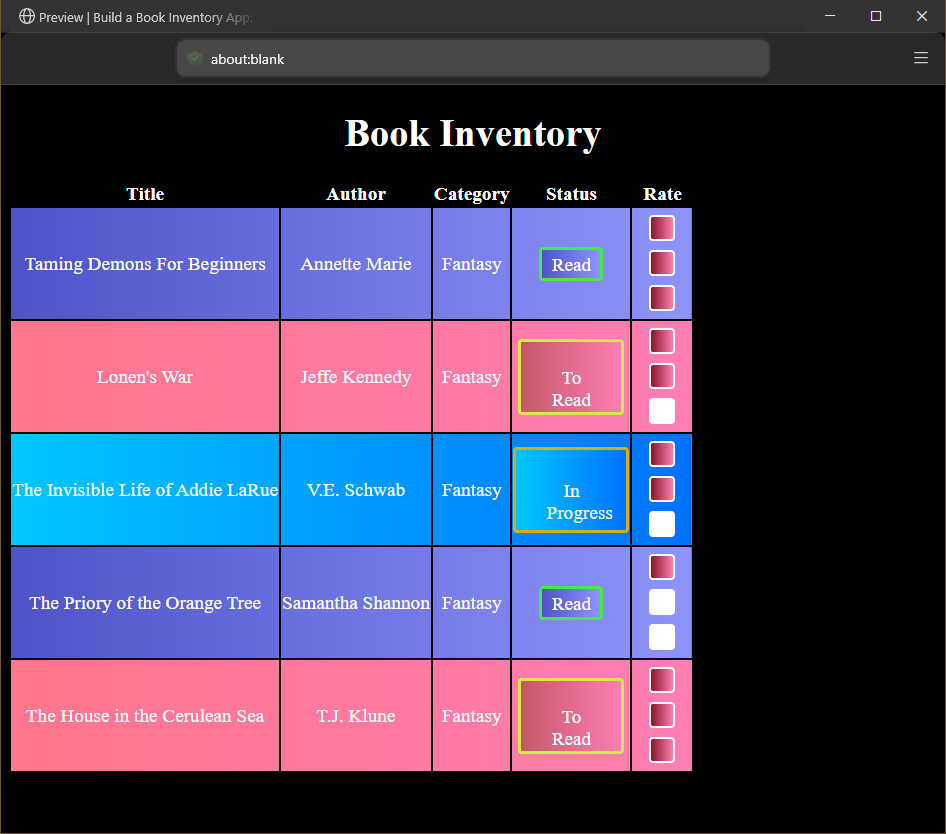
I have been working on it and this is the updated code and it sill does not pass but it shows up like it does.

```

Book Inventory

Book Inventory

<thead>

  <tr>

    <th>Title</th>

    <th>Author</th>

    <th>Category</th>

    <th>Status</th>

    <th>Rate</th>

  </tr>

</thead>

<tbody id="book-list">

  <!-- Book entries will be dynamically inserted here -->

  <!-- Example book entrie 1 -->

  <tr class="read">

    <td>Taming Demons For Beginners</td>

    <td>Annette Marie</td>

    <td>Fantasy</td>

    <td><span class="status">Read</span></td>

    <td>

      <span class="rate three">

        <span></span>

        <span></span>

        <span></span>

      </span>

    </td>

  </tr>

  <!-- Example book entrie 2 -->

  <tr class="to-read">

    <td>Lonen's War</td>

    <td>Jeffry Kennedy</td>

    <td>Fantasy</td>

    <td><span class="status">To Read</span></td>

    <td>

      <span class="rate two">

        <span></span>

        <span></span>

        <span></span>

      </span>

    </td>

  </tr>

  <!-- Example book entrie 3 -->

  <tr class="in-progress">

    <td>The Invisible Life of Addie LaRue</td>

    <td>V.E. Schwab</td>

    <td>Fantasy</td>

    <td><span class="status">In Progress</span></td>

    <td>

      <span class="rate two">

        <span></span>

        <span></span>

        <span></span>

      </span>

    </td>

  </tr>

  <!-- Example book entrie 4 -->

  <tr class="read">

    <td>The Priory of the Orange Tree</td>

    <td>Samantha Shannon</td>

    <td>Fantasy</td>

    <td><span class="status">Read</span></td>

    <td>

      <span class="rate one">

        <span></span>

        <span></span>

        <span></span>

      </span>

    </td>

  </tr>

  <!-- Example book entrie 5 -->

  <tr class="to-read">

    <td>The House in the Cerulean Sea</td>

    <td>T.J. Klune</td>

    <td>Fantasy</td>

    <td><span class="status">To Read</span></td>

    <td>

      <span class="rate three">

        <span></span>

        <span></span>

        <span></span>

      </span>

    </td>

  </tr>

</tbody>

```

CSS

html{
    background-color: #000;
    color: #fff;
    font-size: larger;
    text-align: center;
}

tr[class="read"]{
    background-image: linear-gradient(to right, #4e54c8, #8f94fb);
}

tr[class="to-read"]{
    background-image: linear-gradient(to right, #ff758c, #ff7eb3);
}

tr[class="in-progress"]{
    background-image: linear-gradient(to right, #00c6ff, #0072ff);
    margin: 3px;
    width: 15px;
}

span{
    display: inline-block;
}

tr[class="to-read"] span[class="status"]{
    border: 3px solid rgb(214, 234, 69);
    border-radius: 4px;
    background-image: linear-gradient(to right, #c55769, #ff7eb3);
    padding: 25px;
    display: inline-block;
    text-align: center;
}

tr[class="read"] span[class="status"]{
    border: 3px solid rgb(69, 234, 69);
    border-radius: 4px;
    background-image: linear-gradient(to right, #4e54c8, #8f94fb);
    padding: 4px;
    display: inline-block;
    text-align: center;
}

tr[class="in-progress"] span[class="status"]{
    border: 3px solid rgb(219, 171, 16);
    border-radius: 4px;
    background-image: linear-gradient(to right, #00c6ff, #0072ff);
    padding: 30px;
    display: inline-block;
    text-align: center;
}

span[class="status"], span[class^="rate"] {
    height: 20px;
    width: 50px;
    padding: 4px;
}

span[class^="rate"]>span{
    border: 2px solid #fff;
    border-radius: 4px;
    padding: 6px;
    margin: 2px;
    height: 10px;
    width: 10px;
    background-color: #fff;
}

span[class*="one"] span:first-child{
    background-image: linear-gradient(to right, #891629, #ff7eb3);
}

span[class*="two"] span:nth-child(-n+2) {
    background-image: linear-gradient(to right, #891629, #ff7eb3);
}
span[class*="three"] span {
    background-image: linear-gradient(to right, #891629, #ff7eb3);
}

I hope this is the way it should look .

it is 46 - 51 that it fails.

What are testes tests 46-51?

Which specific lines of your code do you think should meet each of those tests?

In what way?

You need to share your full code and a link to the lesson before anyone has enough context to help you. The “ask for help” button should do this automatically, as I explained. This should help you provide all of the necessary information.

Most of these are just copy/paste templates which might seem impersonal but we need to share this information a lot.

If you can provide a link and all of your code in the future I won’t have to repeat that information. It’s nothing personal I’m just telling you what you need to provide and an easy way to do that.

You are also not allowed to open duplicate topics for the same problem. It’s a rule of the forum that I had to tell you about.

Please don’t take it personally.

If you look at the code you posted, can you see how it’s not formatted correctly?

The first part of the HTML does not show up as code that someone can copy/paste into the editor to help debug your code.

its the last three span elements in the CSS. they need to edit the rating and they do but the test wont pass. I have tried everything and it shows up right in the preview so I am not sure why it is not passing. I have no idea why it is doing this.

span[class*="one"]span:first-child{
    background-image: linear-gradient(to right, #ff758c, #3cc8e1ff);
}

span[class*="two"]span:nth-child(-n+2) {
    background-image: linear-gradient(to right, #ff758c, #6755a8);
}
span[class*="three"]span {
    background-image: linear-gradient(to right, #ff758c, #186aa1);
}

this is what is not passing even though it works right.

Oka but can you say what tests 46-51 are and which line you think meets each of those tests?

  • 46. You should have an attribute selector to target the first descendant of span elements that have the word one as a part of their class value.

  • Failed:47. You should use an attribute selector to target the first descendant of span elements that have the word one as a part of their class value and set its background-image property to use a linear-gradient.

  • Failed:48. You should have an attribute selector to target the first two descendants of span elements that have the word two as a part of their class value.

  • Failed:49. You should use an attribute selector to target the first two descendants of span elements that have the word two as a part of their class value and set their background-image property to use a linear-gradient.

  • Failed:50. You should have an attribute selector to target the span elements that are descendants of span elements that have the word three as a part of their class value.

  • Failed:51. You should use an attribute selector to target the span elements that are descendants of span elements that have the word three as a part of their class value and set their background-image property to use a linear-gradient.

    these are what are failing and the code that goes with it.


* span\[class\*="one"\] span:first-child{

      background-image: linear-gradient(to right, #891629, #ff7eb3);

  }


  span\[class\*="two"\] span:nth-child(-n+2) {

      background-image: linear-gradient(to right, #891629, #ff7eb3);

  }

* 

  span\[class\*="three"\] span {

      background-image: linear-gradient(to right, #891629, #ff7eb3);

  }

cant get it to format it right when copying it over

So, I don’t think this meets test 46

Doesn’t this select elements that meet either condition, not both?

it should only be theirs since they have to look like

the rating are selected for and they need to be individual for the class each goes with. If it is a class of one then only one needs done. A class of two and you get two colored in. a class of three and all of them get it. to select them individually for each class of one two or three would be long and make reading it hard I would think.

You’re sorta missing my point though. Does that selector require both conditions to be met?

for the one it needs to be the first child.

for the second it needs to be the first and second

for the third one it needs to be all of them.

I have tried to change how I am selecting them and that is not working.

they are going off the class in the html which is class=’rate one’ or ‘rate two’ ‘rate three’

I’ve edited your post to improve the readability of the code. When you enter a code block into a forum post, please precede it with three backticks to make it easier to read.

You can also use the “preformatted text” tool in the editor (</>) to add the backticks.

See this post to find the backtick on your keyboard.
Note: Backticks (`) are not single quotes (').