Build an fCC Forum Leaderboard - Build an fCC Forum Leaderboard

Tell us what’s happening:

My code creates the same website like the example project but the avatars function tests fail and there is no {size} in the template path they have already 30 as size

Your code so far

<!doctype html>
<html lang="en">
  <head>
    <meta charset="UTF-8" />
    <meta http-equiv="X-UA-Compatible" content="IE=edge" />
    <meta name="viewport" content="width=device-width, initial-scale=1.0" />
    <title>fCC Forum Leaderboard</title>
    <link rel="stylesheet" href="./styles.css" />
  </head>
  <body>
    <header>
      <nav>
        <img
          class="fcc-logo"
          src="https://cdn.freecodecamp.org/platform/universal/fcc_primary.svg"
          alt="freeCodeCamp logo"
        />
      </nav>
      <h1 class="title">Latest Topics</h1>
    </header>
    <main>
      <div class="table-wrapper">
        <table>
          <thead>
            <tr>
              <th id="topics">Topics</th>
              <th id="avatars">Avatars</th>
              <th id="replies">Replies</th>
              <th id="views">Views</th>
              <th id="activity">Activity</th>
            </tr>
          </thead>
          <tbody id="posts-container"></tbody>
        </table>
      </div>
    </main>
    <script src="./script.js"></script>
  </body>
</html>

<!doctype html>
<html lang="en">
  <head>
    <meta charset="UTF-8" />
    <meta http-equiv="X-UA-Compatible" content="IE=edge" />
    <meta name="viewport" content="width=device-width, initial-scale=1.0" />
    <title>fCC Forum Leaderboard</title>
    <link rel="stylesheet" href="./styles.css" />
  </head>
  <body>
    <header>
      <nav>
        <img
          class="fcc-logo"
          src="https://cdn.freecodecamp.org/platform/universal/fcc_primary.svg"
          alt="freeCodeCamp logo"
        />
      </nav>
      <h1 class="title">Latest Topics</h1>
    </header>
    <main>
      <div class="table-wrapper">
        <table>
          <thead>
            <tr>
              <th id="topics">Topics</th>
              <th id="avatars">Avatars</th>
              <th id="replies">Replies</th>
              <th id="views">Views</th>
              <th id="activity">Activity</th>
            </tr>
          </thead>
          <tbody id="posts-container"></tbody>
        </table>
      </div>
    </main>
    <script src="./script.js"></script>
  </body>
</html>

/* file: script.js */
function avatars(posters, users) {
  return posters.map(posterId => {
    const user = users.find(u => u.id === posterId);
    if (!user) return "";


    let src = user.avatar_template;
    if (src.includes("{size}")) {
      src = src.replace("{size}", "30");
    }


    if (!src.startsWith("http")) {
      src = `${avatarUrl}${src}`;
    }


    return `<img src="${src}" alt="${user.name}">`;
  }).join("");
}

Your browser information:

User Agent is: Mozilla/5.0 (Windows NT 10.0; Win64; x64) AppleWebKit/537.36 (KHTML, like Gecko) Chrome/133.0.0.0 Safari/537.36

Challenge Information:

Build an fCC Forum Leaderboard - Build an fCC Forum Leaderboard

https://www.freecodecamp.org/learn/full-stack-developer/lab-fcc-forum-leaderboard/build-an-fcc-forum-leaderboard

you are right, that is a mistake from the last update of the data, ignore that instructions for now

Thank you, is it possible that the other tests fail because of the errors in the browser console ?

#a @ dom-test-evaluator.js:2

dom-test-evaluator.js:2 TypeError: Cannot read properties of null (reading ‘0’) at eval (eval at #a (dom-test-evaluator.js:2:255051), :30:21) at #a (dom-test-evaluator.js:2:255051) at DOMTestEvaluator.handleMessage (dom-test-evaluator.js:2:256113) at onmessage (dom-test-evaluator.js:2:256432)

dom-test-evaluator.js:2

  1. n

dom-test-evaluator.js:2 TypeError: Cannot read properties of null (reading ‘0’) at eval (eval at #a (dom-test-evaluator.js:2:255051), :32:10) at #a (dom-test-evaluator.js:2:255051) at DOMTestEvaluator.handleMessage (dom-test-evaluator.js:2:256113) at onmessage (dom-test-evaluator.js:2:256432)

#a @ dom-test-evaluator.js:2

this is something that is going wrong for sure

what is the test that is failing? can you share your complete code?

also you will want to remove the html from your css file

sure, Thank you for taking the time.
const forumLatest = ‘https://cdn.freecodecamp.org/curriculum/forum-latest/latest.json’;

const forumTopicUrl = ‘https://forum.freecodecamp.org/t/’;

const forumCategoryUrl = ’ The freeCodeCamp Forum - Join the developer community and learn to code for free. ';

const avatarUrl = ‘https://cdn.freecodecamp.org/curriculum/forum-latest’;

const allCategories = {

299: { category: ‘Career Advice’, className: ‘career’ },

409: { category: ‘Project Feedback’, className: ‘feedback’ },

417: { category: ‘freeCodeCamp Support’, className: ‘support’ },

421: { category: ‘JavaScript’, className: ‘javascript’ },

423: { category: ‘HTML - CSS’, className: ‘html-css’ },

424: { category: ‘Python’, className: ‘python’ },

432: { category: ‘You Can Do This!’, className: ‘motivation’ },

560: { category: ‘Backend Development’, className: ‘backend’ }

};

let postsContainer=document.getElementById(“posts-container”)

const test = Date.now()- (50 * 60 * 1000);

function timeAgo (timeStamp){

const currentTimeStamp = new Date;

const postTimeStamp= new Date(timeStamp)

let timeStampDiv=Math.floor((currentTimeStamp-postTimeStamp)/ (1000 * 60)); //min

if(timeStampDiv<60){ return `${timeStampDiv}m ago`}

if(timeStampDiv<60*24){ return `${Math.floor(timeStampDiv/60)}h ago`}

if(timeStampDiv=>60*24){ return `${Math.floor(timeStampDiv/60/24)}d ago` }

}

function viewCount (vCount){

if(vCount<1000){return vCount}

if(vCount=>1000){return `${Math.floor(vCount/1000)}k`}

}

function forumCategory (id){

let element

if(allCategories[id]){

element=allCategories\[id\]


return \`<a class="category ${element.className}" href="${forumCategoryUrl}${element.className}/${id}">${element.category}</a>\`}

else {return `General`}

}

async function fetchData(){

try{

const response = await fetch(forumLatest)

const data =await response.json()

showLatestPosts (data)

}

catch (error){console.log(error)

}

}

fetchData()

let users

let topics

function avatars(posters, users) {

return posters.map(posterId => {

const user = users.find(u => u.id === posterId);

if (!user) return "";


let src = user.avatar_template;

if (src.includes("{size}")) {

  src = src.replace("{size}", "30");

}


if (!src.startsWith("http")) {

  src = \`${avatarUrl}${src}\`;

}


return \`<img src="${src}" alt="${user.name}">\`;

}).join(“”);

}

function showLatestPosts(data){

users=data.users

//console.log(users)

topics=data.topic_list.topics

topics.forEach((topic)=>{

  let url=\`${forumTopicUrl}${topic.slug}/${topic.id}\`

  let posters=  \[\]

  topic.posters.forEach((poster)=>posters.push(poster.user_id))

  let latestPost=topic.bumped_at 

  let views=topic.views


  let post_count=topic.posts_count-1

  let poster_img=avatars(posters,users)


  //console.log(poster_img)

  postsContainer.innerHTML+=

  \`<tr>

  <td>

    <a class="post-title" href="${url}">${topic.title}</a>

    ${forumCategory(topic.category_id)}

  </td>

  <td><div class="avatar-container">${poster_img}</div></td>

  <td>${post_count}</td>

  <td>${viewCount(views)}</td>

  <td>${timeAgo(latestPost)}</td>

  </tr>\`      

})

}

can you please do that again but formatting the code? if I copy your code as is, there are many escaped characters and it would not work

When you enter a code block into a forum post, please precede it with three backticks to make it easier to read.

You can also use the “preformatted text” tool in the editor (</>) to add the backticks.

See this post to find the backtick on your keyboard.
Note: Backticks (`) are not single quotes (').

const forumLatest =  'https://cdn.freecodecamp.org/curriculum/forum-latest/latest.json';
const forumTopicUrl = 'https://forum.freecodecamp.org/t/';
const forumCategoryUrl = 'https://forum.freecodecamp.org/c/';
const avatarUrl = 'https://cdn.freecodecamp.org/curriculum/forum-latest';

const allCategories = {
  299: { category: 'Career Advice', className: 'career' },
  409: { category: 'Project Feedback', className: 'feedback' },
  417: { category: 'freeCodeCamp Support', className: 'support' },
  421: { category: 'JavaScript', className: 'javascript' },
  423: { category: 'HTML - CSS', className: 'html-css' },
  424: { category: 'Python', className: 'python' },
  432: { category: 'You Can Do This!', className: 'motivation' },
  560: { category: 'Backend Development', className: 'backend' }
};

let postsContainer=document.getElementById("posts-container")

const test = Date.now()- (50 * 60 * 1000);

function timeAgo (timeStamp){
const currentTimeStamp =  new Date;
const postTimeStamp= new Date(timeStamp)

let timeStampDiv=Math.floor((currentTimeStamp-postTimeStamp)/ (1000 * 60)); //min

if(timeStampDiv<60){  return `${timeStampDiv}m ago`}
if(timeStampDiv<60*24){  return `${Math.floor(timeStampDiv/60)}h ago`}
if(timeStampDiv=>60*24){  return `${Math.floor(timeStampDiv/60/24)}d ago` }
}

function viewCount (vCount){
if(vCount<1000){return vCount}
if(vCount=>1000){return `${Math.floor(vCount/1000)}k`}
}

function forumCategory (id){
  let element
  if(allCategories[id]){
    element=allCategories[id]

    return `<a class="category ${element.className}" href="${forumCategoryUrl}${element.className}/${id}">${element.category}</a>`}
else {return `<a class="category general" href="${forumCategoryUrl}general/${id}">General</a>`}

}

async function fetchData(){
  try{
  const response = await fetch(forumLatest)
  const data =await response.json()

  showLatestPosts (data)
  }
  catch (error){console.log(error)
  }  
}

fetchData()
let users
let topics


function avatars(posters, users) {
  return posters.map(posterId => {
    const user = users.find(u => u.id === posterId);
    if (!user) return "";


    let src = user.avatar_template;
    if (src.includes("{size}")) {
      src = src.replace("{size}", "30");
    }


    if (!src.startsWith("http")) {
      src = `${avatarUrl}${src}`;
    }


    return `<img src="${src}" alt="${user.name}">`;
  }).join("");
}


function showLatestPosts(data){
  users=data.users
  //console.log(users)
  topics=data.topic_list.topics


  topics.forEach((topic)=>{
   
      let url=`${forumTopicUrl}${topic.slug}/${topic.id}`
      let posters=  []
      topic.posters.forEach((poster)=>posters.push(poster.user_id))
      let latestPost=topic.bumped_at 
      let views=topic.views

      let post_count=topic.posts_count-1
      let poster_img=avatars(posters,users)
      
      //console.log(poster_img)
      postsContainer.innerHTML+=
      `<tr>
      <td>
        <a class="post-title" href="${url}">${topic.title}</a>
        ${forumCategory(topic.category_id)}
      </td>
      <td><div class="avatar-container">${poster_img}</div></td>
      <td>${post_count}</td>
      <td>${viewCount(views)}</td>
      <td>${timeAgo(latestPost)}</td>
      </tr>`      


 })
}

how are you testing your avatars function?

here an example

const posters = [{ user_id: 6 }, { user_id: 285941 }, { user_id: 170865 }];
const users2 = [
  {
    avatar_template:
      '/user_avatar/QuincyLarson_{size}.png',
    id: 6,
    name: 'Quincy Larson',
    username: 'QuincyLarson'
  },
  {
    avatar_template:
      '/user_avatar/jwilkins.oboe_{size}.png',
    id: 285941,
    name: 'Jessica Wilkins',
    username: 'jwilkins.oboe'
  },
  {
    avatar_template:
      '/user_avatar/ilenia_{size}.png',
    id: 170865,
    name: 'Ilenia',
    username: 'ilenia'
  },
  { id: 20 }
];

const actual = avatars(posters, users2);
console.log(actual);

it returns nothing, an empty string I guess

<img src="https://cdn.freecodecamp.org/curriculum/forum-latest/user_avatar/QuincyLarson_30.png" alt="Quincy Larson"><img src="https://cdn.freecodecamp.org/curriculum/forum-latest/user_avatar/JOY-OKORO_30.png" alt="Joy Okoro"><img src="https://cdn.freecodecamp.org/curriculum/forum-latest/user_avatar/nickrg_30.png" alt="Nicolas Greenwood">

What are you showing? I do not understand, please use your words

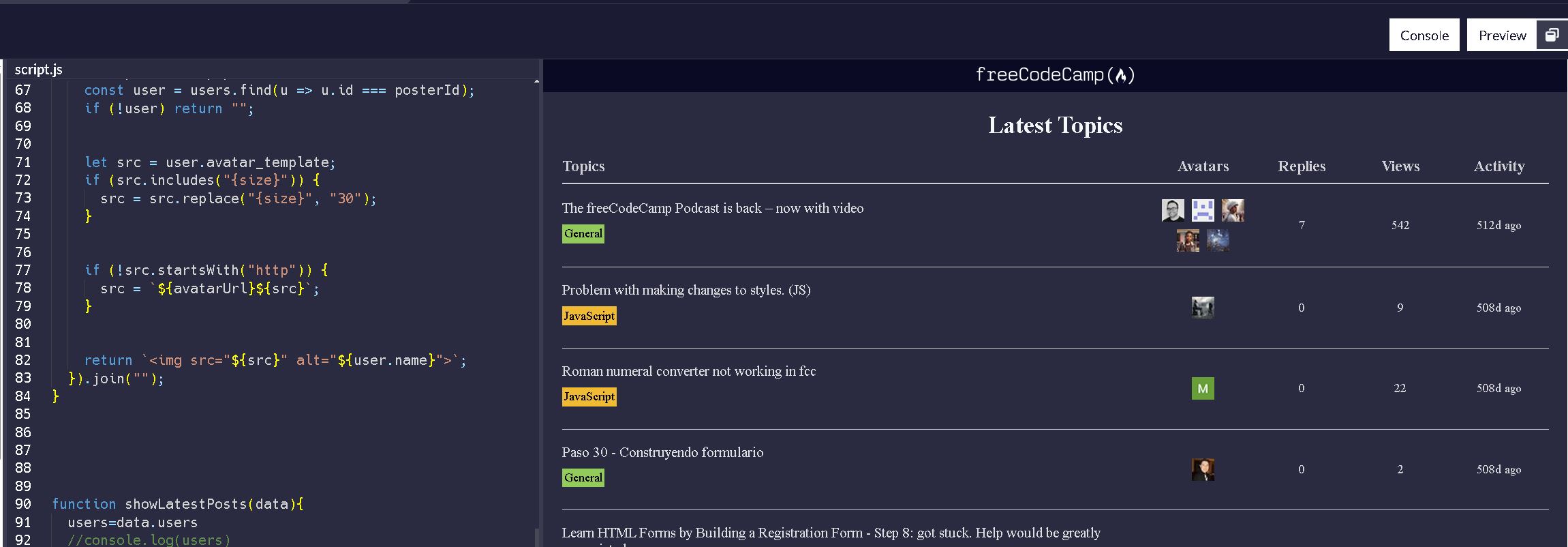
I send the a part of the string that gets returned from the Avatar function and an screenshot of the preview window that is exactly the same as the example project

I do not get that with the code you shared, and the test data I shared, so you may want to test with that data, or share your actual code if it’s not the one you shared already

I modified the code to directly use the topic.posters instead of creating an array with the id’s. Now it passed the test. It might be good to add this requirement to the user story, because if the result is the same it should pass the test. Thank you

user stories 8-10 describe how the avatars function should work