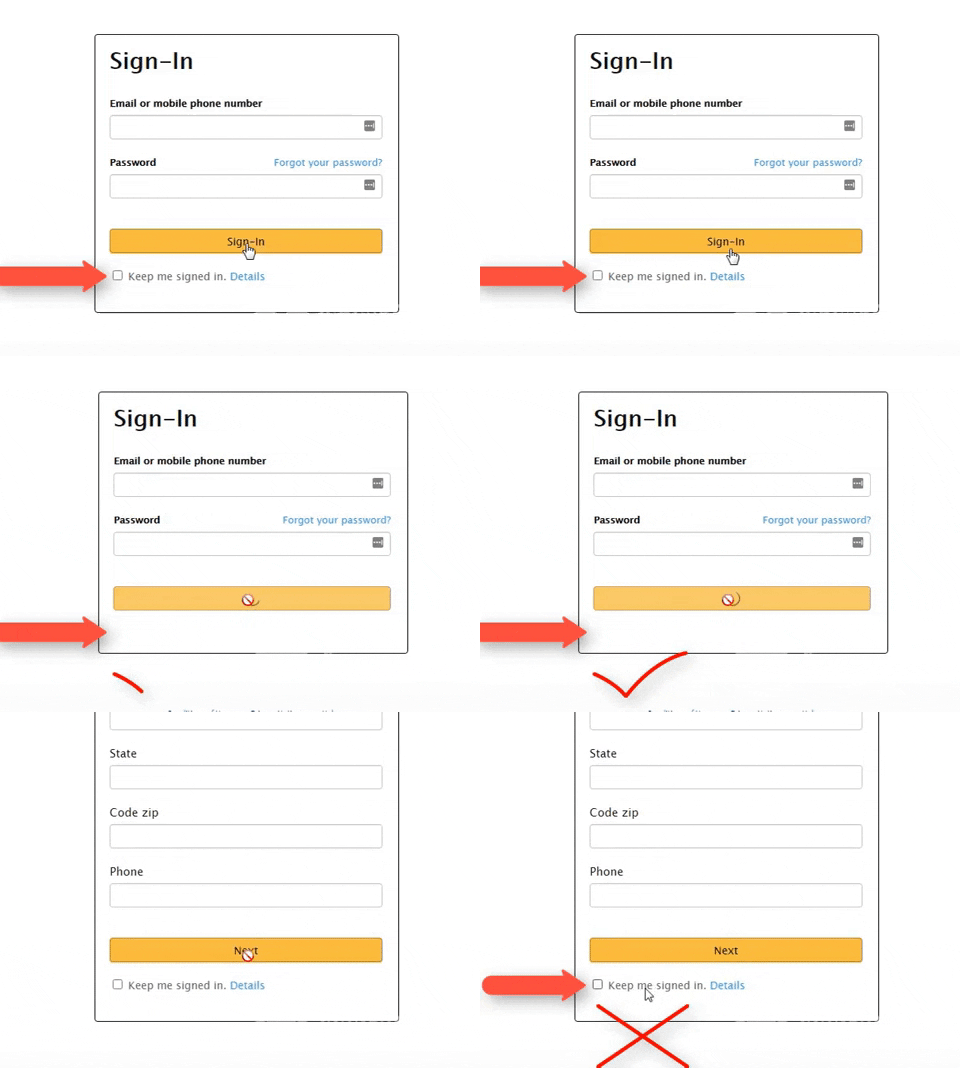
I want to permanently hide the <div class="show_hide" id="hide_this"> after pressing the submit button
<button class="frm_button_submit" id="toggle" type="submit" [button_action]>[button_label]</button>
<div class="show_hide" id="hide_this">
<label><input type="checkbox" name="rememberMe" value="true" tabindex="4"><i class="a-icon a-icon-checkbox"></i><span class="a-label a-checkbox-label">
Keep me signed in.
<span class="a-declarative" data-action="a-popover" data-a-popover="{"activate":"onclick","header":"\"Keep Me Signed In\" Checkbox","inlineContent":"\u003cp>Choosing \"Keep me signed in\" reduces the number of times you're asked to Sign-In on this device.\u003c\/p>\n\u003cp>To keep your account secure, use this option only on your personal devices.\u003c\/p>"}">
<a id="remember_me_learn_more_link" href="javascript:void(0)" class="a-popover-trigger a-declarative">
Details
<i class="a-icon a-icon-popover"></i></a>
</span>
</span></label>
</div>
What do you mean by permanently? Should it say hidden even after the user refreshes the page?
Because if so you need some state storage. You can look at using localStorage.
I’ve edited your post for readability. When you enter a code block into a forum post, please precede it with a separate line of three backticks and follow it with a separate line of three backticks to make it easier to read.
You can also use the “preformatted text” tool in the editor (</>) to add backticks around text.
<div class="frm_submit">
[if back_button]<button type="submit" name="frm_prev_page" formnovalidate="formnovalidate" class="frm_prev_page" [back_hook]>[back_label]</button>[/if back_button]
<button class="frm_button_submit" type="submit" id="toggle" [button_action]>[button_label]</button>
<div id="hideOnSubmit">
<label><input type="checkbox" name="rememberMe" value="true" tabindex="4"><i class="a-icon a-icon-checkbox"></i><span class="a-label a-checkbox-label">
Keep me signed in.
<span class="a-declarative" data-action="a-popover" data-a-popover="{"activate":"onclick","header":"\"Keep Me Signed In\" Checkbox","inlineContent":"\u003cp>Choosing \"Keep me signed in\" reduces the number of times you're asked to Sign-In on this device.\u003c\/p>\n\u003cp>To keep your account secure, use this option only on your personal devices.\u003c\/p>"}">
<a id="remember_me_learn_more_link" href="javascript:void(0)" class="a-popover-trigger a-declarative">
Details
<i class="a-icon a-icon-popover"></i></a>
</span>
</span></label>
</div>
[if save_draft]<a href="#" tabindex="0" class="frm_save_draft" [draft_hook]>[draft_label]</a>[/if save_draft]
</div>
<script type="text/javascript">
document.querySelectorAll('.frm_prev_page').forEach(function(a){
a.remove()
})
document.querySelector("#toggle").addEventListener("click", () => {
  elementToHide.style.display = "none";
});
</script>
It disappears in the first step, but returns in the second step
<div class="frm_submit">
[if back_button]<button type="submit" name="frm_prev_page" formnovalidate="formnovalidate" class="frm_prev_page" [back_hook]>[back_label]</button>[/if back_button]
<button class="frm_button_submit" type="submit" id="toggle" [button_action]>[button_label]</button>
<div class="frm_button_submitt" id="hideOnSubmit">
<label><input type="checkbox" name="rememberMe" value="true" tabindex="4"><i class="a-icon a-icon-checkbox"></i><span class="a-label a-checkbox-label">
Keep me signed in.
<span class="a-declarative" data-action="a-popover" data-a-popover="{"activate":"onclick","header":"\"Keep Me Signed In\" Checkbox","inlineContent":"\u003cp>Choosing \"Keep me signed in\" reduces the number of times you're asked to Sign-In on this device.\u003c\/p>\n\u003cp>To keep your account secure, use this option only on your personal devices.\u003c\/p>"}">
<a id="remember_me_learn_more_link" href="javascript:void(0)" class="a-popover-trigger a-declarative">
Details
<i class="a-icon a-icon-popover"></i></a>
</span>
</span></label>
</div>
[if save_draft]<a href="#" tabindex="0" class="frm_save_draft" [draft_hook]>[draft_label]</a>[/if save_draft]
</div>
<script type="text/javascript">
document.querySelectorAll('.frm_prev_page').forEach(function(a){
a.remove()
})
const elementToHide = document.querySelector("#hideOnSubmit");

document.querySelector("#toggle").addEventListener("click", () => {
  elementToHide.style.display = "none";
});
</script>
Obviously it will not stay hidden for the next form if that is made out of new HTML. I have no idea how you are constructing each step but you will have to account for the state from the first step.