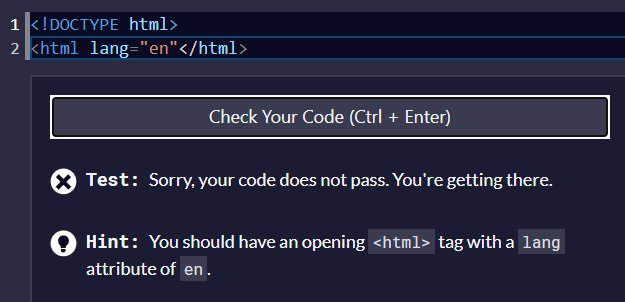
I have no idea why this isnt working. I even looked other’s and it is the exact same yet mine is wrong. Any help appreciated!
Your code so far
<!DOCTYPE html>
<html lang="en">
Your browser information:
User Agent is: Mozilla/5.0 (Windows NT 10.0; Win64; x64) AppleWebKit/537.36 (KHTML, like Gecko) Chrome/105.0.0.0 Safari/537.36
Challenge: Learn Basic CSS by Building a Cafe Menu - Step 1
Link to the challenge:
Read the hint.
## Hint

You should have a closing `<html>` tag. Remember that closing tags have a `/` following the opening `<` bracket.
I get an error when I tried that too.
you took the “lang” out of the html element. You must keep it inside the opening tag, just like you did the first time, you only needed to close it.
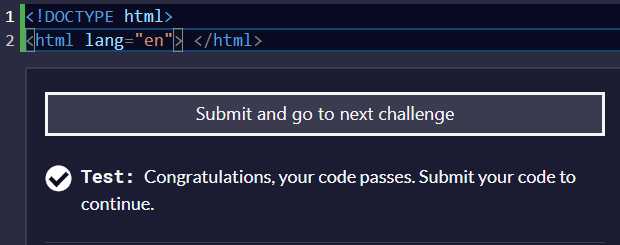
<html lang="en">
like this? I am still getting an error
Correct, but you forgot to close the opening tag.
<element> </element>
<html> </html>
nope, I have tried that too! BTW, thank you so much for helping me! I thought I was going crazy
html is an element, lang is an attribute of the html element. Attributes go in the opening tag of the element, before you close it with >.
<element attribute="value"> </element>
In this case, your element is the HTML, your attribute is lang, and its value is en.
Feel free to ask away whenever you need help.
LOL I went back through all of our messages and it finally clicked, got it!
hbar1st
February 1, 2023, 4:03pm
11
please don’t post solutions to fcc challenges here.
We are trying to cut back on the number of spoiler solutions found on the forum and instead focus on helping other campers with their questions and definitely not posting full working solutions.