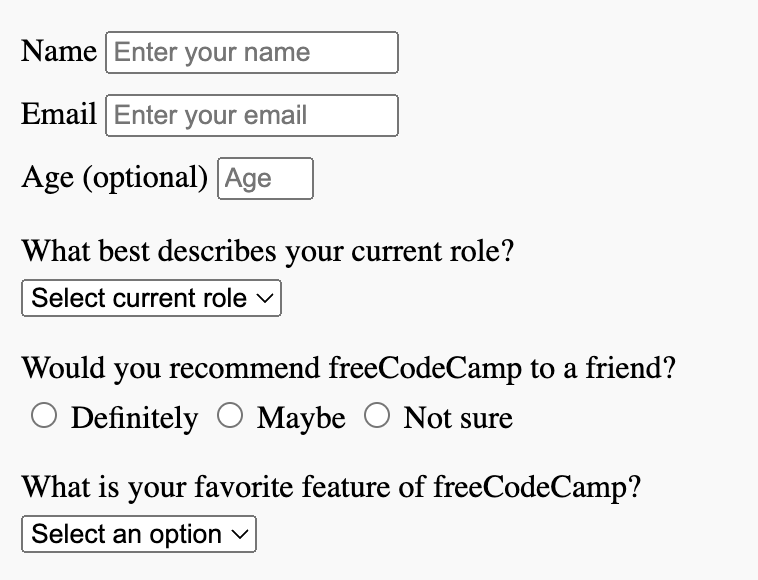
So I’m trying to get my paragraphs to go to the left side of the form, I’ve been trying to put my text-align to the left but it’s not doing anything. What am I missing and what CSS can I use to move them over so they aren’t just in the middle of the form? Thanks!
body {
    display: flex;
    flex-direction: column;
    justify-content: center;
    align-items: center;
    height: 100vh;
}

header {
    text-align: center;
    margin-bottom: 20px;
}

#name-label {
    text-align: left;
    margin-left: 0;
}


#survey-form {
    max-width: 500px;
    padding: 20px;
    background-color: #f9f9f9;
}

#survey-form>div {
    margin-bottom: 10px;
}

#survey-form>div>p {
    text-align: center;
    margin-bottom: 5px;
}

#comments {
    height: 150px;
    width: 100%;
}

#submit {
    display: block;
    margin-top: 10px;
}
<!DOCTYPE html>
<html>

<head>
    <title>freeCodeCamp Survey Form</title>
    <link rel="stylesheet" href="styles.css">
</head>

<body>
    <header>
        <h1 id="title" class="text-center">freeCodeCamp Survey Form</h1>
        <p id="description" class="description-text-center">Thank you for taking the time to help us improve the platform</p>
    </header>
    <div>
        <form id="survey-form">
            <div class="form-group">
                <label for="name" id="name-label">Name</label>
                <input type="text" id="name" placeholder="Enter your name" required>
            </div>
            <div class="form-group">
                <label for="email" id="email-label">Email</label>
                <input type="email" id="email" placeholder="Enter your email" required>
            </div>
            <div class="form-group">
                <label for="number" id="number-label">Age <span class="clue">(optional)</span></label>
                <input type="number" id="number" placeholder="Age" min="16" max="100" required>
            </div>
            <div class="form-group">
                <p for="dropdown">What best describes your current role?</p>
                <select id="dropdown" placeholder="Select current role" class="form-control">
                    <option disabled selected value>Select current role</option>
                    <option value="Student">Student</option>
                    <option value="full-time">Full Time Job</option>
                    <option value="learner">Full Time Learner</option>
                    <option value="prefer-no">Prefer not to say</option>
                    <option value="other">Other</option>
                </select>
            </div>
            <div class="form-group">
                <p>Would you recommend freeCodeCamp to a friend?</p>
                <label>
                    <input class="input-radio" type="radio" name="radio-group" value="definitely"> Definitely
                </label>
                <label>
                    <input class="input-radio" type="radio" name="radio-group" value="maybe"> Maybe
                </label>
                <label>
                    <input class="input-radio" type="radio" name="radio-group" value="not-sure"> Not sure
                </label>
            </div>
            <div class="form-group">
                <p for="dropdown">What is your favorite feature of freeCodeCamp?</p>
                <select id="dropdown-menu" placeholder="Select an option">
                    <option value="" disabled selected>Select an option</option>
                    <option value="challenges">Challenges</option>
                    <option value="projects">Projects</option>
                    <option value="community">Community</option>
                    <option value="open-source">Open Source</option>
                </select>
            </div>
            <div class="form-group">
                <p>Choose multiple options:</p>
                <input type="checkbox" name="checkbox-group" value="front-end"> Front-end Projects
                <input type="checkbox" name="checkbox-group" value="back-end"> Back-end Projects
                <input type="checkbox" name="checkbox-group" value="data-visualization"> Data Visualization
                <input type="checkbox" name="checkbox-group" value="challenges"> Challenges
                <input type="checkbox" name="checkbox-group" value="open-source"> Open Source Community
                <input type="checkbox" name="checkbox-group" value="gitter-help"> Gitter help rooms
                <input type="checkbox" name="checkbox-group" value="videos"> Videos
                <input type="checkbox" name="checkbox-group" value="city-meetups"> City Meetups
                <input type="checkbox" name="checkbox-group" value="wiki"> Wiki
                <input type="checkbox" name="checkbox-group" value="forum"> Forum
                <input type="checkbox" name="checkbox-group" value="additional-courses"> Additional Courses
            </div>
            <div class="form-group">
                <p for="comments">Additional Comments or Suggestions?</p>
                <textarea id="comments" placeholder="Enter your comments here..."></textarea>
            </div>
            <div class="form-group">
                <button type="submit" id="submit">Submit</button>
            </div>
        </form>
    </div>
</body>

</html>```