Below is my HTML Code and an abridged version of my javaScript code. I opted to go with this approach as it is a nearly complete certification project, which much of code not relevant to my query, however I will provide it, if requested. Note in abridging the code I changed one line, that is const {types}=data;, the full version of that line has many more non-blank characters.
const searchBtn=document.getElementById("search-button");
async function viewCreatureStats() {
  const typesP=document.getElementById("types");
  typesP.innerText=``;
      fetch(`https://rpg-creature-api.freecodecamp.rocks/api/creature/${searchInput}`)
  .then(res => res.json())
  .then((data)=>{
        //consider .map() and hasOwnProperty() methods
    const {types}=data;
    console.log(types.name);//Line is there for debugging only
    if (types){
      typesP.innerText=`Has the following Types`
      types.forEach(typeN=>typesP.innerText+=` ${typeN.name}`);
    }
  })
//return;
}
searchBtn.addEventListener("click", viewCreatureStats);
I am pretty sure this line if (types){ is at least one of the lines at fault but not sure how to correct it, but feel free to indicate other errors.
a single element should be added within the #types element that contains the text FIRE two elements should be added within the #types element that contain text values WATER and ROCK
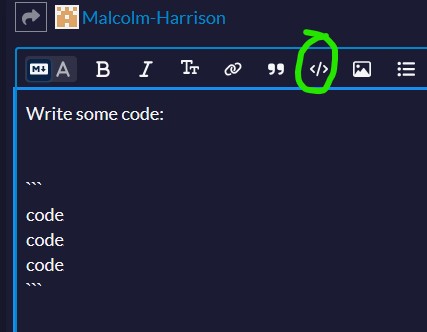
It does happen for me the same way as image. On click the </> button back ticks are not created is instead the background for the code. One line height which is then expanded to the height of your code.
What exactly is it that you know about what I posted from the instructions? Does your code create an HTML element that contains the name of the type? There should be no other text. Look at the example app.
Yes your comment takes me closer however either I need help to make my approach as is work (if and forEach) change the innerText of my TypesP element or need help for a different approach that this.