Tell us what’s happening:
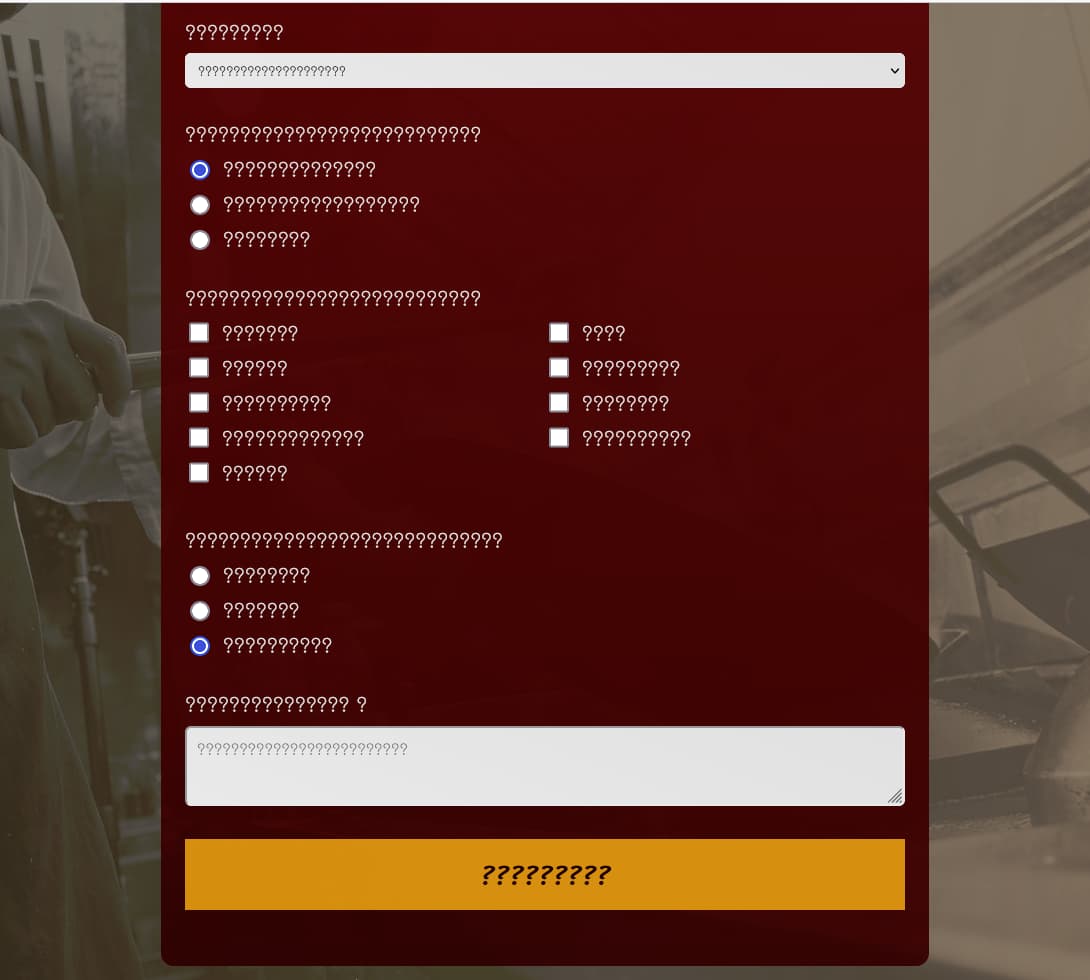
Hello, I created a survey form and the padding and margin works as I wanted when viewing on my local machine (chrome and edge). The inputs are centered correctly inside the form, left and right are equally spaced. But when I copied the code onto codepen, it displays differently (the somehow the margin on the right side is less than on the left side).
This is my codepen page : https://codepen.io/badjoe/pen/PoQwRmB
Thanks a lot !
Your code so far
<html>

<head>
    <title>Padthai Order Form</title>
    <link rel="stylesheet" href="style.css">
</head>

<body>
    <header>
        <h1 id="title">ใบสั่งผัดไทย</h1>
        <p id="description">ขอบคุณที่มาใช้บริการร้านเชฟโจครับ</p>
    </header>

    <div class="container">
        <form id="survey-form">

            <div class="form-block">
                <label id="name-label" for="name">ชื่อ</label>
                    <input type="text" id="name" name="name" class="form-control" placeholder="กรุณาใส่ชื่อ" required>

            </div>

            <div class="form-block">
                <label id="email-label" for="email">อีเมล </label>
                    <input type="email" id="email" name="email" class="form-control" placeholder="กรุณาใส่อีเมล"
                        required>

            </div>

            <div class="form-block">
                <label id="address-label" for="address">ส่งที่</label>
                    <input type="text" id="address" name="address" class="form-control"
                        placeholder="กรุณาใส่ที่อยู่ทีจัดส่ง" required>

            </div>

            <div class="form-block">
                <label id="number-label" for="number">จำนวน<span class="clue"></span></label>
                    <input type="number" id="number" name="number" min="1" max="200" class="form-control"
                        placeholder="กรุณาเลือก" required>

            </div>


            <div class="form-block">
                <label>
                    เลือกเมนู
                </label>
                <select id="dropdown" class="form-control">
                    <option value="original">ผัดไทยกุ้งสดต้นตำหรับ</option>
                    <option value="veggy">ผัดไทยมังสวิรัติบางกอก</option>
                    <option value="saltyegg">ผัดไทยไข่เค็มลาวาภูเขาไฟ</option>
                    <option value="seafood">ผัดไทยรวมมิตรสัตว์ทะเล</option>
                    <option value="tissue">ผัดไทยห่อไข่ทิชชู่</option>
                    <option value="forkid">ผัดไทยสำหรับเด็กเล็ก</option>
                    <option value="chef">ผัดไทยตามใจเชฟ</option>
                </select>
            </div>

            <div class="form-block">
                <p>ชนิดของเส้นผัดไทยที่ต้องการ</p>
                <label for="chan-normal">
                    <input type="radio" name="noodle-type" id="chan-normal" value="chan-normal" checked>เส้นจันทร์ปกติ
                </label>

                <label for="chan-small">
                    <input type="radio" name="noodle-type" id="chan-small" value="chan-small">เส้นจันทร์เส้นเล็ก
                </label>

                <label for="glass">
                    <input type="radio" name="noodle-type" id="glass" value="glass">วุ้นเส้น
            </div>

            <div id="cook-without" class="form-block">
                <p>
                    วัตถุดิบที่ไม่ต้องการให้ใส่
                </p>
                <div id="cook-without-grid">
                <label><input type="checkbox" name="cbox" value="beansprout">ถั่วงอก
                </label>
                <label><input type="checkbox" name="cbox" value="spice">พริก
                </label>
                <label><input type="checkbox" name="cbox" value="sugar">น้ำตาล
                </label>
                <label><input type="checkbox" name="cbox" value="chives">ใบกุยช่าย
                </label>
                <label><input type="checkbox" name="cbox" value="peanut">ถั่วลิสงบด
                </label>
                <label><input type="checkbox" name="cbox" value="dried-shrimp">กุ้งแห้ง
                </label>
                <label><input type="checkbox" name="cbox" value="tofu">เต้าหู้เหลือง
                </label>
                <label><input type="checkbox" name="cbox" value="sweet-radish">ไชโป้วหวาน
                </label>
                <label><input type="checkbox" name="cbox" value="shallot">หอมแดง</label>
                </div>
            </div>

            <div id="cutlery-div" class="form-block">
                <p>ต้องการช้อนส้อมหรือตะเกียบไหม</p>
                <label for="spoonfork">
                    <input type="radio" name="cutlery" id="spoonfork" value="spoonfork">ช้อนส้อม
                </label>

                <label for="chopsticks">
                    <input type="radio" name="cutlery" id="chopsticks" value="chopsticks">ตะเกียบ
                </label>

                <label for="no-cutlery">
                    <input type="radio" name="cutlery" id="no-cutlery" value="no-cutlery" checked>ไม่ต้องการ
            </div>


            <div class="form-block">
                <p>ความต้องการอื่น ๆ</p>
                <textarea id="comment" placeholder="กรุณาระบุความต้องการพิเศษ"></textarea>
            </div>

            <div class="form-block">
                <input type="submit" id="submit" value="สั่งอาหาร">
            </div>

        </form>
    </div>

</body>

</html>
@import url('https://fonts.googleapis.com/css2?family=Sriracha&family=Mali&display=swap');
:root {

    --container-bg-1: rgb(236, 236, 236);
    --container-bg-2: rgb(228, 228, 228);
    --container-white-text: rgb(232, 232, 232);
}

body {

    font-family: Mali;
    margin: 0;
    padding: 2.2rem 2.2rem 1.2rem 2.2rem;
    color: var(--container-white-text);
}

body::before{
    content: '';
    position: fixed;
    top: 0;
    left: 0;
    z-index: -1;
    height: 100%;
    width: 100%;
    background-image: linear-gradient(
        100deg,
        rgba(64, 58, 48, 0.7),
        rgba(119, 97, 75, 0.8)
      ),url(https://static.vecteezy.com/system/resources/previews/001/928/310/large_2x/black-and-white-of-a-chef-cooking-free-photo.jpg);
    background-size:cover;
    background-repeat: no-repeat;
    background-position: right;
}

header{
    text-align: center;
    font-size: 1.8rem;
}

h1{
    margin-bottom: 0;
}

@media(max-width: 500px) {
    header {
        font-size: 1.5rem;
    }
    header p {
        margin: 10px auto 20px auto;
        font-size: 1.2rem;
    }
    body {
        /* font-size: 1.1rem; */
    }
}


.container{
    color: --container-white-text;
    background-image: linear-gradient(180deg,rgba(107, 0, 0, 0.88), rgba(52, 0, 0, 0.88));
    padding: 1.5rem;
    border-radius: 13px;
    margin: 3.125rem auto 0 auto;
}

@media (min-width: 576px) {
    .container {
      max-width: 540px;
    }
  }

  @media (min-width: 768px) {
    .container {
      max-width: 720px;
    }
  }

label {
    display: flex;
    font-size: 1.3rem;
    margin-bottom: 0.5rem;
}

p{
    font-size: 1.3rem;
    margin-bottom: 0.5rem;
}

.form-block {
    margin-bottom: 2rem;
}
.form-control{
    display: block;
    width: 100%;
    padding: 0.5rem;
    background-color: var(--container-bg-1);
    background-clip: padding-box;
    border: 1px solid var(--container-bg-1);
    border-radius: 6px;
    border-color: var(--container-bg-1);
    transition: border-color 0.20s, box-shadow 0.30s;
    margin-left: auto;
    margin-right: auto;

}

@media (min-width: 500px) {
    #cook-without-grid {
        display: grid;
        grid-template-columns: 50% 50%;

    }
}

.form-control:focus,
textarea:focus {
    border-color: rgb(255, 141, 118);
    outline: 0;
    box-shadow: 0 0 0 0.2rem rgba(215, 125, 92, 0.416);
}

[type="radio"],
[type="checkbox"] {
    /* display: inline-block; */
    min-width: 20px;
    min-height: 20px;
    margin-right: 0.8rem;
}

[type="radio"]:checked,
[type="checkbox"]:checked {
    color: orange;
}

textarea {
    resize: vertical;
    min-height: 80px;
    border-radius: 6px;
    border-color: var(--container-bg-1);
    width: 100%;
    padding: 10px;
    transition: border-color 0.20s, box-shadow 0.30s;

}


textarea::placeholder {
    font-family: Mali;
}


.form-control, textarea {

    background: linear-gradient(20deg, var(--container-bg-1), var(--container-bg-2));
}


.form-block,
.form-control,
.form-control::placeholder
{
    /* color: var(--container-white-text); */
    font-family: inherit;
}

#submit {
    cursor: pointer;
    width: 100%;
    padding: 10px;
    background-color: rgba(237, 155, 12, 0.925);
    color: var(--container-white-text);
    color:rgb(37, 0, 0);
    border: none;
    font-size: 1.8rem;
    font-family: Sriracha;
}
Your browser information:
User Agent is: Mozilla/5.0 (Windows NT 10.0; Win64; x64) AppleWebKit/537.36 (KHTML, like Gecko) Chrome/101.0.4951.41 Safari/537.36
Challenge: Build a Survey Form
Link to the challenge: