Every time I try to run the tests by clicking the “Check Your Code” button, I get this error:
Error: Timed out waiting for the test frame to load
This has been happening consistently for the last 3 days , and I haven’t been able to move forward in the lessons.
can you reply as fast as possible…!
ILM
July 24, 2025, 5:26pm
2
this issue is under investigation
to help, can you provide the User Agent you see here: What is my user agent? - WhatIsMyBrowser.com
and also your browser console logs and information about the network requests.
Hi
Thank you for helping with this issue.
I’m using Microsoft Edge 137 on Windows 11 (confirmed via WhatIsMyBrowser).
bash
CopyEdit
Client: Error: Timed out waiting for the test frame to load
Unhandled Error caught in error-saga
The error pops up when I try to run tests. There’s also a banner saying:"Something went wrong. Please try again in a moment or contact “support@freecodecamp. org if the error persists.”
I checked the Network tab , and while the requests seem to return 200 and 204, the frame still fails to load.
Console logs and error: test frame timeout
Please let me know if I should test on a different browser version or collect a HAR file for more detail.
Thanks again for your support!
reply fast
ILM
July 26, 2025, 5:00pm
6
the issue is being investigated, you can try a different browser or something like that
i tried with all the possible browser but still not working properly.
jellvk
August 1, 2025, 3:49am
8
It has happened to me too, but only when I do the Learn CSS Grid by Building a Magazine Course. Anything else is fine for me. I am using chrome.
ILM
August 1, 2025, 7:24am
9
do you have errors in the console? do you have failed network requests in the network tab of the dev tools?
jellvk
August 2, 2025, 5:01am
11
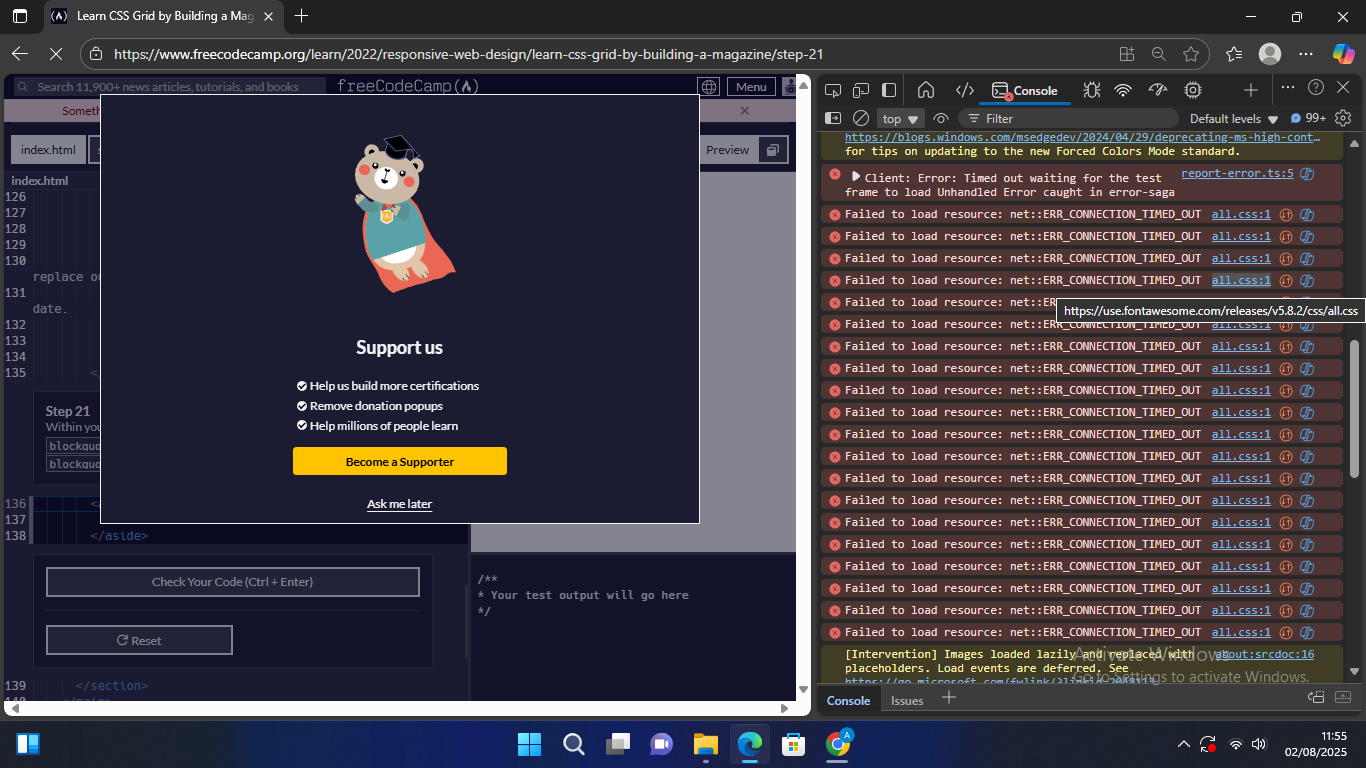
I’m sorry for the late update, I tried to open the consoles and showing error like the image attachment
Each time continuing on the next stage . the preview take a long time to load.
And then when I try to delete the
href="https://use.fontawesome.com/releases/v5.8.2/css/all.css"
it go fast and normal like other web course before and after.

 Browser Info:
 Attached Screenshots: